Notice: Function _load_textdomain_just_in_time was called incorrectly. Translation loading for the acf domain was triggered too early. This is usually an indicator for some code in the plugin or theme running too early. Translations should be loaded at the init action or later. Please see Debugging in WordPress for more information. (This message was added in version 6.7.0.) in /home2/vpnauthority/public_html/wp-includes/functions.php on line 6170
Deprecated: version_compare(): Passing null to parameter #2 ($version2) of type string is deprecated in /home2/vpnauthority/public_html/wp-content/plugins/elementor/core/experiments/manager.php on line 132
Deprecated: Function WP_Dependencies->add_data() was called with an argument that is deprecated since version 6.9.0! IE conditional comments are ignored by all supported browsers. in /home2/vpnauthority/public_html/wp-includes/functions.php on line 6170
Deprecated: Function WP_Dependencies->add_data() was called with an argument that is deprecated since version 6.9.0! IE conditional comments are ignored by all supported browsers. in /home2/vpnauthority/public_html/wp-includes/functions.php on line 6170 December 2018 - VPN Authority
If you want to ensure that your online
activities remain private, your best bet is to use a VPN.
Governments around the world have gotten more
and more invasive in regards to online anonymity. Just recently, the Australian
government passed a bill that can enforce technology companies to hand over
private internet usage data to them
In this article, we’ll show you how you can
protect your privacy by setting us a VPN.
What is a VPN and why do I need it?
VPN, or Virtual Private Network, is one in which
a user’s IP address is replaced with that of a Virtual Private Network
provider. For example, you might live in Perth, but you can make it seem like
you live in San Francisco or New York.
This has a number of benefits. However, the most
important is that it makes it impossible for third parties to gain access to
your internet activities. Whatever you do online is kept secure and anonymous.
Furthermore, most VPN services have a strict No Logging policy. As such, they
cannot reveal their users’ information even if the government legally enforces
them to.
Furthermore, a VPN can also be used to bypass
geographical restrictions. For example, Netflix filters content based on the
country that the user is accessing it from at the moment. If you need to view
content available in some other country, you can use VPN to fool Netflix into
thinking you’re in that country.
For these reasons — and many others — a VPN can
prove extremely useful.
Which VPN Service to use?
There are a number of VPN services out there.
However, two of the best VPN services with locations in Australia are NordVPN
and ExpressVPN.
NordVPN has over 4,400 servers across 62 countries, out of which 204 are located in Australian cities like Perth, Melbourne, and Sydney. ExpressVPN has over 2,000 servers in 94 countries, with over 100 located in Australian cities. Furthermore, both follow a strict No Logging policy. As such, both of them are ideal VPNs to use.
How to Set Up VPN?
Once you have decided which VPN service to use,
you need to simply download and set it up. You can do so in the following
steps:
After you purchase the correct
VPN, you’ll have to provide your contact details, including your email address.
A link will be sent to your email.
The link will take you to a
webpage from which you can download the VPN for the relevant device or devices,
be it a smartphone, Windows computer, Mac, iPhone, etc.
After downloading the file,
you’ll receive an activation code.
Install the VPN software or
app.
After installation, launch it
and ‘Sign In’ with your account details as provided during purchase.
You will now have to enter your
activation code.
Now you’ll be signed into the
VPN.
You’ll get an option to select
a location of your choice. You can click on that to get a list of server
locations. You can select the server that you want. If you’re using VPN to
access Netflix, you can set up the server according to the country for which
you want content. For example, if you want to access American Netflix, you can
set up the server for New York, California, etc.
After selecting the server,
turn VPN on.
The aforementioned steps might differ slightly
from one service to the next. But this should be the general template to
follow.
After you have set your VPN, you can start
surfing the internet as you want without any fears of your private data being accessed
by anyone else!
CyberGhost
is one of the few VPN services that we have watched morph from being geek-centric to user-friendly. Perhaps the
company realizes that VPNs are no longer the realm of just computer engineers
or those fringe privacy advocacy groups. With over 1700 servers located in 60
countries across the world, the Romania
based CyberGhost has a strict no-logging policy putting it beyond the reach of
law enforcement agencies. Not to mention the fact that it is arguably one of
the best services for people who want to surf the internet in Australia without
Big Brother watching their every move.
In
this review, we’ll dissect CyberGhost VPN
to reveal if it worth considering for Australians who want an extra layer of
privacy when connected to public networks, and their home internet alike.
Special Features
Unblocking Streaming Services
We’ll admit that many other VPN services tested over
the months claim to be able to unblock Netflix and Hulu. However, in reality, CyberGhost VPN is one of the few that
makes it possible. We tested CyberGhost’s ‘Unblock Streaming’ feature and were
easily able to unblock American Netflix and UK’s Netflix. That’s in addition to
specific servers for streaming services like BBC iPlayer, Hulu, Crunchyroll, etc. All of these worked flawlessly during our
testing.
Choose WiFi Specific
Security
Another nifty little feature is CyberGhost VPN’s
ability to identify individual Wi-Fi networks and apply a predefined set of
privacy features. For instance, CyberGhost VPN installed on your mobile device
will automatically encrypt all traffic when connected to an airport’s VPN but
will not encrypt traffic when connected
to the home network. Advanced settings allow
users also to add exceptions for specific
programs so the traffic to and from which will not be encrypted or pass through
a VPN server.
AD Blocking
AD Blocking is another excellent feature that works
flawlessly. Not only that but it will block websites with trackers and malware.
There is also the option of enforcing HTTPS rules. While CyberGhost isn’t the
only VPN service to provide Ad Blocking, it does have the lowest instances of
false positives.
Privacy & Anonymity
To
start with CyberGhost VPN uses what it calls military-grade
encryption. However, the ‘settings’ menu on the app allows users to choose
either OpenVPN, L2TP, IKEv2 or leave it on Auto. By default, we found that the software uses OpenVPN in most cases.
Plus,
they proudly boast of having a “strict no logs policy.” We read through CyberGhost VPN’s Privacy Policy page, and it does appear that the claim is more than
just marketing speak. Not having logs tied to your IP address means that
security agencies and law enforcement have no way to knowing for sure what you
were doing online. The same goes for hackers and corporate spies.
Speed and Performance
Now
before we go into discussing the speed and performance of CyberGhost VPN, it is essential
to mention that measuring performance reliably
is difficult. Many factors influence the speed
and performance of a VPN that said we ran speed tests by connecting to multiple
servers. We also used multiple speed
measuring services, i.e. OpenSpeedTest,
Fast and SpeedTest.
We
connected to servers within Australia and New Zealand which delivered the best
speeds averaging out at around 8Mbps on an otherwise 10Mbps connection.
When
connecting to servers in America, the
speed took a bigger hit. Our connection to a server in Washington clocked in at
6Mbps on average with the lowest being around 5Mbps. The same was the case with
servers in Europe clocking in an average of 6Mbps. The slowest speeds were from
servers in Eastern Europe which measured an average of 4Mbps.
Connecting
to servers in Asia slowed things down even further with the average speed in
Japan being 2Mbps. However, it is to be expected
as distance increases latency which in turn affects speed. So, Australians who
want the best speed may want to stick
with servers on the continent.
We
firmly believe that your mileage may vary
but not be too much from what we experienced. However, the majority of
Australians are not on a 10Mbps connection which is why apart from browsing the
web the slow down associated with trying to stream US Netflix will be
noticeable. That said if all you want is to browse the web, send emails and
chat with business partners securely the drop-in speed will not matter a lot.
Perhaps you may want to try out the service before buying.
Ease of use (Desktop and Mobile)
Desktop Experience
CyberGhost
VPN is optimized for Desktop operating
systems like Mac and Windows. It is straightforward
to use, and all the advanced features are
just a single click away. If anything it is a frustration-free
experience compared to the competition with often complex interfaces.
Mobile Apps
iOS: CyberGhost VPN’s iOS app is quick
and simple to use thanks to the big and bold ‘Connect’ and ‘Disconnect’ button.
It connects to the fastest and nearest server by default. Though you can also choose a location by tapping on the location
tab. You can see the number of people connected to each server and save a location to the ‘Favorites’ list.
Android App: on Android devices, the CyberGhost VPN app works
differently but not necessarily in a good way. You are not prompted with your current WiFi network like it is on the
iOS app. You also don’t have a Favorites list and can’t see the number of
connected users to each server. However what you do get are a couple of web
filtering options not available on the iOS version of the app. You can also
block trackers, malicious websites and compress data.
Cyberghost VPN Servers and Locations
1700
servers located in 60 countries across the world. Out of which 53 servers are located in Australia, namely Brisbane, Sydney,
and Melbourne.
Customer Support
Apart
from a massive library of information
subscribers can chat live with a support professional or send them an email.
Unfortunately, the Live Chat feature is buried deep within the website and
requires you click the ‘Help’ button located on the bottom right, then enter a
phrase to search the knowledge base, and only after that do you see the ‘Chat’
button. Once you do connect with a support person the response is quick and, in
our experience, they were knowledgeable.
Value for money
It
indeed isn’t the cheapest VPN service out
there, but it isn’t the most expensive
out there either. That said when it comes to value for money, we’ll rate it 6
out of 10!
Our Verdict
CyberGhost VPN is a very easy to use, robust and secure VPN service that’s worth considering by regular people and businesses alike. Most people will find the Netflix unblocking, Bitcoin support and live chat to be major draws to the service. Perhaps the only drawback is consistency across iOS
VPNs (Virtual Private Networks) have become the go-to solution for bypassing geographic or content restrictions. They are also used for maintaining privacy and encrypting data transferred over the internet. This privacy and security is especially important when connecting to public WiFi networks to prevent third-parties from potentially hacking your computer.
VPNs function by
transmitting your data to private servers spread out across the globe and then
connecting you to your destination. This masks your IP address so you cannot be
detected since you’re functioning through an intermediary.
A lot of people
seem to believe that VPNs are extremely expensive. However, that is not true.
In addition to some very reasonable VPN services, you also have access to a
number of free VPNs in Australia.
In this article,
we’ll explore the benefits and drawbacks of using free VPNs and the best free
VPNs to be used in Australia.
Overview of Free VPNs in Australia
FreeVPNs come in
many forms. Some VPNs are free in their entirety. And some free VPNs are only
free provisionally. For instance, some VPNs might be free when used for a
single device or for a limited time period. Some VPNs are completely free, but
they lack certain features available in paid VPNs. The following are some of
the main advantages and disadvantages of free VPNs.
Advantages
They’re free!
They require minimal setup. You can
simply launch and use them, no purchases, no provision of information.
Disadvantages
Lack Security: VPNs are meant to protect your
privacy and prevent hackers from getting you. However, a number of free VPNs
can put you at greater risk of being hacked. This is because free VPNs rely
extensively on pop-up advertisements for their revenue. And many of these ads
carry malware that can infect your device. If you’re not VERY careful while
selecting a free VPN, your device can be hacked.
Invasion of Privacy: VPNs are meant to keep your
activities anonymous. Paid VPN services often maintain a strict No Logging
policy and can be held accountable. However, there’s no accountability with
free VPNs. They have to make their money somehow. So they embed the VPN with
third-party trackers that collect your information and sell it off to bidders.
Inability to Bypass Geographic
Restrictions: Most
free VPNs are fairly basic. They don’t have the tools to successfully change
your IP address and are unable to unblock Netflix or other similar services.
Slow Speed: Using free VPNs can drastically
slow down your internet connection. Even paid VPNs slow down your speed, but
only negligibly. But with free VPNs, you might as well be using a dial-up
connection.
Advertisements: Free VPNs bombard you with so many
ads on every screen that you will inadvertently end up clicking on several of
them. Not only is this annoying, but many of them — as already mentioned —
carry malicious malware.
Lack of Crucial Features: Paid VPNs come with several
crucial features to protect your privacy and anonymity. One such feature is
Kill Switch. If you’re accessing a site that your government doesn’t permit,
this feature can be extremely useful. If your VPN connection is lost for some
reason, this feature can immediately shut down all your pages, protecting your
privacy. However, with free VPNs, you don’t get access to this feature. As
such, if the VPN should suddenly shut down, your activity — at that moment —
will become completely visible.
Sale of Bandwidth: Various free VPNs drain their free
users’ bandwidth and they divert it to their paying customers.
All of the aforementioned drawbacks render free VPNs to be quite harmful if you’re not careful. As such, if you need to use VPNs on an extremely infrequent basis, you can use them. However, if you use VPNs with any degree of frequency, you should get a paid VPN service, especially since there are a lot of cheap options out there. Most VPN providers also offer a money back guarantee.
NordVPN has a 30 day money back guarantee. Get up to 75% off with this offer.
Top 3 Free VPNs in Australia
Now that you’ve
been warned about the drawbacks of free VPNs, the following are the 3 best free
VPNs in Australia. We’ve vetted them to make sure that they don’t carry malware
or other malicious intent.
Update: As checked on 17 July 2019, Hotspot Shield has made it a little bit trickier to use the free version. Read our guide below to use Hotspot Shied for free.
Hotspot Shield is one of the most popular free VPNs with servers in Australia. They are a legit VPN service with a paid version, but the free version also grants users limited access.
The free version of this VPN can grant users up to 500MBs per day. That’s not enough for streaming, but it’s enough for casual browsing or bypassing specific site restrictions. In addition to space limitation, the free version can only be used on one device. Another limitation, which was the most troublesome in our testing was that you can only connect to their US server meaning relatively low speeds. In our speed testing carried out on a connection in Perth we saw a 40% decrease in speed when connecting to the US based Hotspot Shield Server.
Despite the limitations, it is still highly recommended because they have great data encryption and are fast. As such, they don’t compromise security, even in the free version.
On computers you will see the below screen presented with different plans which gives the impression that there is no free plan. The trick is to click the little left arrow button in the top left corner (highlighted below)
Click on the small left arrow on the top left corner to be taken to the connection screen.
2. TunnelBear
Update: As checked on 17 July 2019, TunnelBear is now only giving 500mb free data per month. This is almost not worth it so we recommend you sign up with HotSpot shield instead who are providing 500mb per day. Of course you can use them in combination.
TunnelBear is an extremely basic free VPN with no additional feature besides simply hiding your IP.
They have been
bought by McAfee so you know they can be trusted. They currently have around
1,000 servers spread out across 20 server locations, including Australia.
Furthermore, they take privacy and security very seriously. As such, they don’t
even collect first names when signing up.
The free version of this VPN limits you to 500MBs per day,per month and that’s the only drawback here, other than the limited suite of features. If you choose to upgrade to a paid plan, you can get it for as little as $4.99 a month.
3. Hide.me
Hide.me is a
Malaysia-based VPN service available in over 50 geographic locations, including
Australia. They have a monthly limit of only 2GB, which is hardly enough to
stream a single movie on Netflix. The connection speed isn’t great either.
However, they have zero ads, they follow a strict no logging policy, and they
offer full customer support even to free users.
So now you know all about the best free VPNs on the market. As already mentioned, you should be extremely cautious while using free VPNs. The ones we’ve mentioned are generally considered to be safe, but there are a lot of malicious free VPNs out there as well.
Other Paid Options
Currently, our top-rated VPN provider is NordVPN who provide top-notch security at an excellent price. Through this link, you will receive up to 75% off the plan cost.
Netflix has been available in Australia since it launched in 2015. Since then, they have been steadily adding content to their media library every month. Netflix has already established itself as the staple means of consuming movies and TV shows across the globe.
However, a lot of people have expressed frustrations with the limited content in Netflix Australia. As a result of licensing restrictions, a lot of the content available in US Netflix is not available in Australia.
If you want to access American Netflix content, you’ll have to bypass Netflix’s geographical restrictions. In this article, we’ll show you how to get American Netflix in Australia.
Benefits of Accessing American Netflix
The greatest advantage of accessing American Netflix in Australia is gaining access to a much wider library of content. As of December 2018, American Netflix has a library comprising 1157 TV shows and 4593 movies. Australian Netflix, in comparison, only streams 443 TV shows and 1583 movies. Australian Netflix users can essentially access only one-third of the content available to their American counterparts.
And if you think the content you’re missing out on is only US specific, you’d be wrong. The following is a list of popular TV shows and movies available on US Netflix but not on Australian Netflix.
American Horror Story, Better Call Saul, Breaking Bad, DC’s Legends of Tomorrow, Friends, Frasier, Glee, Grey’s Anatomy, Supernatural, The West Wing, The Walking Dead, iZombie. Beauty & the Beast, American Crime, Scandal, Dexter.
As you can see, you’re missing out on some incredibly popular and critically-acclaimed TV series and movies! If you want access to them, you’ll have to access US Netflix.
How to access American Netflix in Australia?
Netflix has a traveler-friendly policy. It uses your IP address to determine your current location. As such, if you leave the country and travel elsewhere, you’ll be able to access that country’s Netflix library instead of your own.
As such, to access content from US Netflix, you need to fool Netflix into thinking you’re currently in the US. And that’s where VPNs come in.
You need to find a suitable VPN service, sign up with them, and install it in the device from which you’re accessing Netflix. It will allow you to bypass the geographical restrictions and access American Netflix even from Australia.
What is VPN and how can it bypass Geographical Restrictions?
VPN (Virtual Private Network) essentially creates a private network for you from the public internet connection. These private servers are distributed across the globe. As such, you can access the internet by “tunneling” through a private network of another country.
You get to choose the network you’d like to access. As such, you can choose a network located in a US city, like New York, California, San Francisco, etc. When you do this, all your traffic will be processed through that American Netflix.
This will allow you to fool Netflix into thinking you’re in the US even if you’re halfway across the world in Australia. There are a number of other advantages of using VPNs as well. But this is the one most relevant to accessing American Netflix.
Netflix Cracking Down on VPN Services
In 2016, Netflix released a statement addressing the rise of VPN services and their ability to bypass their geographical restrictions:
Some members use proxies or “unblockers” to access titles available outside their territory… in coming weeks, those using proxies and unblockers will only be able to access the service in the country where they currently are.
Since then, Netflix has cracked down on those using VPN services. As such, several VPN services are incapable of bypassing Netflix’s geographical restrictions.
However, there are still plenty of VPN services you can use to access American Netflix in Australia. You just have to be careful with your selection.
Which VPN Service can be used to access US Netflix from Australia?
In order to access US Netflix from Australia, you need to use reliable paid VPN services. Currently, the two best VPNs to bypass Netflix’s geographic restrictions are NordVPN and ExpressVPN.
NordVPN has approximately 1900 servers in the US. ExpressVPN has approximately 224 servers in the US. Both are perfectly capable of bypassing Netflix’s restrictions and granting you access to American Netflix.
How to use VPN to Access US Netflix in Australia?
Sign up with either NordVPN or ExpressVPN.
Download and install them in your device of choice.
Launch the application and sign in.
Connect to one of the US VPN servers.
Access Netflix, either through the web browser or an app.
Get access to US Netflix.
If you want to revert to Australian Netflix, simply turn off the VPN and log into Netflix again.
With these simple steps, you’ll have the world’s largest media library at your fingertips! Now feel free to watch US Netflix and Chill!
In recent years, the term VPN has become a common part of the internet vocabulary and general public consciousness. Regardless of whether you’ve ever used a VPN or even know what it is, you’ve probably heard about it.
In this article, we’ll tell you what exactly a VPN is and give you all the reasons why you should start using it.
What is a VPN?
VPN, short for Virtual Private Network, creates a private network for you from the public internet connection. This allows you to surf the internet and conduct your activities anonymously without being traced and without your information being tracked. They essentially mask your IP address so that all your online actions are untraceable.
Why you need to use a VPN?
The following are some of the primary reasons to start using a VPN service.
Anonymity and Privacy: This is the most obvious advantage of a VPN service. Internet providers around the world keep your internet usage metadata on their servers which can be accessed by anyone. As such, information regarding your internet usage can be leaked online, can be hacked, and it can even be given to the government. However, with a VPN, all of your data is encrypted so no one can access them, not even the VPN service company.
Bypass Government Censorship: Various governments around the world enforce strict censorship on the internet. Some governments block torrent sites, some block porn sites, some block LGTBQ content, and some even censor media that’s critical of the government. Using a VPN, you can bypass all of those restrictions and take complete control over the internet, that too away from the government’s prying eyes.
Bypass Netflix/Streaming Geographic Restrictions: Netflix, Hulu, and other streaming services limit their programs when broadcasting outside the US. As such, if you’re anywhere else in the world, based on your login IP address, you don’t have access to Netflix’s entire directory of content. However, a VPN service allows you to manipulate your IP address so it seems like you’re accessing Netflix from a server within the USA. This will give you access to all the content available to users in the USA.
Securely Accessing Public WiFi: We often find ourselves connected to public WiFi, be it in a coffee shop, hotel, airport, or other similar public locations. These WiFi networks are notorious for being unsafe and they do not follow any encryption protocols. As such, even a basic hacker will be able to access your online activities without breaking a sweat. If you often find yourself accessing public WiFi, you need to secure yourself with a VPN.
Privacy during Video Calls: Voice-over-IP, i.e., video calls conducted over Facetime, Skype, etc, are extremely unsafe. Any hacker can access your camera and gain access to your visuals and microphone to either record you secretly or simply eavesdrop. If you often use these VOIP services, you need a VPN.
While the aforementioned reasons are some of the most pertinent, they don’t even scratch the surface of all the reasons you can benefit from a VPN service. Suffice it to say, if you value privacy at all, you need to invest in a reasonable VPN service.
ExpressVPN has over the years attracted a lot of praise for being fast, stable and highly secure. However, does all of that merit the slightly higher price that users have to pay? While Express VPN has evolved over the years, today it is touted as being amongst the best services out there. The question you’re probably asking is, what does ExpressVPN offer to Australian users that others don’t?
In this review, we’ll go into what features make ExpressVPN stand out and if it is all worth the extra you are paying for it? By the end of this review, you should be able to decide if this is the right VPN service for you.
Top ExpressVPN Features at a Glance
Now before we go into details, we’ll start with the top features that make ExpressVPN stand out. We’ll go into a little more detail of each in subsequent sections below.
Blazing Fast Speed – Now this is one feature we’ve heard a lot about, and our testing shows that there is something to it. We tested ExpressVPN, and found that the speeds are great, the results of which we’ve posted in the ‘How Fast is Express VPN’ section below. We conduct extensive testing from our Australian base on all VPN services we review.
Highly Capable Browser Extensions – ExpressVPN’s selection of browser extensions for Firefox, Safari and Chrome are not halfhearted efforts, but full-blown add-ons that enrich your experience.
Stream Netflix with Ease – ExpressVPN allows you to stream US Netflix as well as from other regions easily. We tested this for ourselves, and the results were remarkable.
A Wide Selection of VPN Servers – ExpressVPN has servers in 160 locations across 94 countries. So, there is no shortage of servers regardless of what region you choose.
How Fast is ExpressVPN?
ExpressVPN is, without a doubt, one of the fastest VPN services on the planet. However, not being ones to take the company’s word for it or the word of other reviewers, we decided to put that claim to the test from our office in Perth using an NBN connection.
We ran multiple tests and for each location assuring that these aren’t one-off figures. Below are the screenshots from our tests.
Base Internet Speed without a VPN
We kicked off our round of testing with a base speed test, which capped out at a decent 47.73 Mbps. That was followed by a series of tests by connecting to servers across Australia, including one right here in Perth.
Connected to a Server in PerthConnected to a Server in SydneyConnected to a Server in Docklands
We then decided to test the speeds of ExpressVPN’s international servers connecting to a server in San Francisco, USA and another in Singapore. As you can see below, there was hardly a megabyte of difference in speeds on average compared with connecting to servers in Australia. This result is remarkable considering that most other VPN services generally throttle speeds by as much as 20% – 35% of their original base speed.
Connected to a Server in San Francisco, USAConnected to a Server in Singapore
The one thing we are unable to explain is the dismal upload speeds when connected to the server in Singapore. We assume it has something to do with the way that server is configured or because it might have been under heavy load each time, we reran the test.
Apps and Extensions
ExpressVPN has a compatible app across for just about any device you can think of or perhaps use. However, ExpressVPN’s full capabilities are only available via its desktop app (Windows and Mac). Sure there are apps for iOS and Android, but during our testing, both apps weren’t as feature-filled as their desktop counterparts. The Windows and Mac version of the ExprssVPN app is like it’s from another planet.
Express VPN’s iOS and Android Apps
The Android and iOS apps can be installed from the Google Play or App Store, respectively. Configuration, for the most part, is automatic. You say ‘Yes’ to a few security measures, set up a couple of preferences and choose a server to connect with. The ‘Auto-Connect’ feature allows you to connect with the best server that the software finds at random when your mobile device is fired up.
While the initial setup on iOS and Android devices is the same, they differ a bit, from each other in the way of features. However, none of these apps has all the features you’ll find with their desktop counterparts.
Now for starters, there is no Tor compatibility on a mobile device. So, there is no way to get added Tor privacy, which is not something most people will need or even know about but not having it will certainly be missed by techies like us.
The IPv6 leak protection, while available on mobile devices, does not work as well as it does on desktop devices. There was no way to tell when IPv6 was blocking traffic, which made it hard to use.
ExpressVPN’s speed test isn’t available on mobile devices, so you can’t test it for server latency and overall all download speeds. Though we must admit, connections are reliable. We didn’t experience any buffering during our tests and lags were nonexistent too. In fact, most people like us will find that ExpressVPN’s mobile app is a lot snappier than its desktop counterparts.
iOS users can choose between IPSEC/IKEv2 and OpenVPN protocols. However, because Android only supports OpenVPN, that’s the only choice. Fortunately, OpenVPN is the highest standard and the only protocol that 99% of users will ever need.
Chrome and Firefox Browser Extensions
ExpressVPN has a very good dedicated browser extension for both Fox and Chrome. Both browsers together make up 80% of the market. However, it would have been great if there were similar extensions for Microsoft Edge and Opera, both of which are now growing in popularity amongst security-conscious users.
Circling back to the apps, these do a fantastic job of encrypting traffic that goes through the browser. So, almost everything you do is encrypted. It is like a split tunnelling feature, with the only difference being that you don’t need to have ExpressVPN’s desktop app turned on for it to work.
The add-on can be installed directly to Chrome or Firefox and is a handy feature for people who find themselves using a public WiFi connection like at a local coffee shop.
Router App
We like the fact that ExpressVPN has an app that can be installed and used on routers. Installing the app on your router will protect every device in your home, or that’s connected to that router, even if they don’t have ExpressVPN installed. So, traffic to and from your TVs, tablets, mobiles and games are pass through ExpressVPN’s app installed on your router.
Setting up the app on your router requires going through a couple of quick steps. You can choose your specific router from ExpressVPN’s website, and then you’re provided with an installation guide for that router.
If your router isn’t listed, it is still possible to manually configure the VPN on your own. However, doing so will mean that you miss out on important security updates and present features if the app isn’t configured correctly.
The router app also allows you to configure which devices don’t use a VPN. Those settings can be tweaked via the ‘split tunnelling’ feature, which will enable you to add or remove devices within minutes.
Using Express VPN for Torrenting
One of the biggest benefits of using ExpressVPN is for torrenting. Unlike other VPNs we’ve reviewed in the past, there are no data caps, and so you get unrestricted 24/7 torrenting. Furthermore, P2P file sharing is also allowed across all of its servers instead of a handful like competing VPN services.
Another benefit of using ExpressVPN for torrenting is privacy. The company does not keep any logs, and because it is headquartered in a privacy-friendly location, all of that torrenting activity can’t be leaked. So, whether it is BitTorrent or uTorrent clients, it is safe to use. Though we caution all our readers against downloading or sharing copyrighted content.
DNS protection via the company’s DNS across every server helps to prevent leaks further and thus revealing what you’re downloading or uploading via the torrent client. That’s why if it is P2P that you want to use, it can’t get any better than ExpressVPN, even in the speed and performance department.
Streaming Region-Specific Netflix with Express VPN – Possible?
The short answer is Yes! It is possible to stream Netflix via ExpressVPN. However, it isn’t as cut and dry like that. Now we’re located in Perth and connected to a US server to see if we could access Netflix’s US libraries. To our surprise, it worked 3 out of 3 times that we tried. We were also able to stream in HD without a hitch.
We then headed over to the Canadian library by connecting to a server in Toronto. Again, here too the experience is quick, easy and worked 9 out of 10 times! We then tried Germany, and for some reason ran into a couple of geo-blocks, while connected to various servers in Hamburg and Frankfurt. However, we were finally able to stream when connected to a server in Nuremberg.
We were also able to stream Netflix’s library in Chile, Brazil and a couple of other places. During this time, we didn’t experience any fuzzy pictures, stuttering or lag.
So, if bypassing Netflix’s geo-block is your priority, it does not get any better than ExpressVPN. However, there is more!
Using ExpressVPN, we were also able to stream across Hulu, HBO Go, Amazon Prime Video and BBC iPlayer. Unlike other services, it works without too much trial and error. Furthermore, we were able to bypass geo-restrictions on YouTube, Facebook, and Google in addition to others.
Privacy and Security Features
ExpressVPN uses the very best 256-bit AED encryption. It combines AES 256-bit cypher along with a 4096-bit RSA key as well as an SHA-512 HMAC authentication. In layman’s terms, all of this means that the same key that’s used to encrypt all this data needs to be to decrypt it. So, that makes it impossible to bypass or break even by using the world’s more powerful computer.
ExpressVPN also uses what’s called perfect forward secrecy. It is an advanced feature which tends to change your encryption key each time to log-into a sever. So every time you’re assigned a new key for a new session. Plus, data from any previous session is dissociated from your current session. If anyone attempts to hack your browser, they will find nothing for as long as you were connected to ExpressVPN.
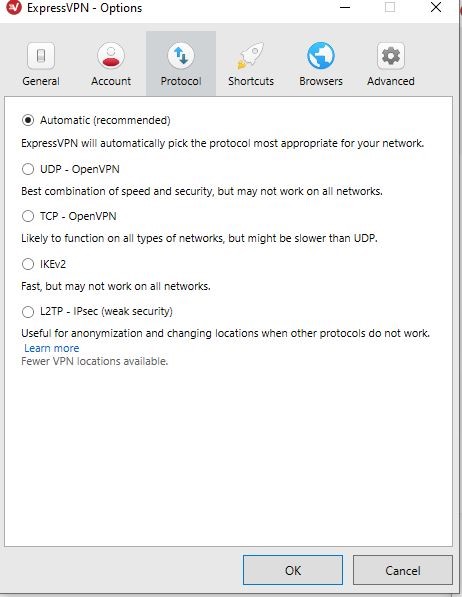
ExpressVPN uses many different security protocols and will choose the best one to ensure the most reliable connection. OpenVPN UDP is set as the default protocol, but you can also switch to PPTP, OpenVPN TCP, and L2TP/IPsec.
Kill Switch
While the Kill Switch feature isn’t exclusive to ExpressVPN, their implementation of it is highly effective. Kill Switch works by keeping a user’s IP address and traffic secure even if the connection with the server drops. ExpressVPN terms this feature a “Network Lock,” and there is a downside to it too. The downside is you don’t know when the Kill Switch is activated.
So, even though it bocks traffic while your connection to the internet is compromised, the feature is automatically enabled by default, so there is no need to enable it manually. The feature is available for Windows, Linux, Mac, and routers. On Android, this feature is called network protection, but on iOS, it is something different.
iOS does not have a kill switch, unfortunately. While that’s the downside, it certainly isn’t a complete deal-breaker.
Split Tunneling
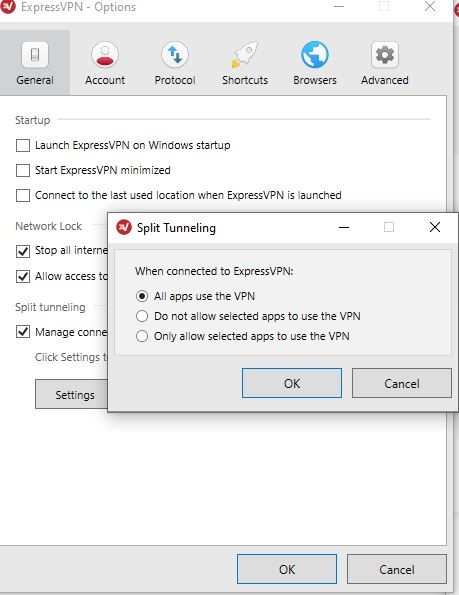
Split Tunneling is one of the ExpressVPN’s standout features and enables you to encrypt traffic through specific programs and browsers while all others can use the internet unfiltered. The feature allows you to both browse the internet via a VPN and regularly at the same time. The only thing you need to do is decide which apps use the VPN. Fortunately, ExpressVPN makes adding and removing apps easy simply click on the ‘+’ symbol to add an app.
During our time reviewing ExpressVPN, we were able to use Firefox, unfiltered and Chrome which was connected to the VPN at the same time. We streamed YouTube videos, visited websites and even checked our IP address on both browsers to verify that they were both showing different locations.
We are happy to report that the feature works as advertised.
Leak Protection
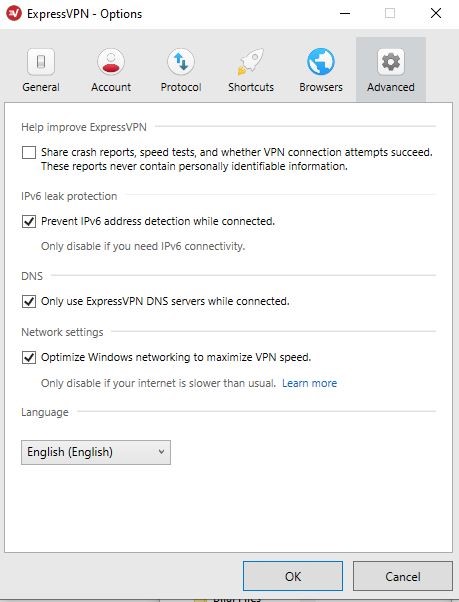
Even though all traffic is sent through an encrypted connection, there is always the possibility of it leaking a phenomenon called DNS leak. A DNS leak can reveal your online activities to your ISP, which in Australia may not be as big of an issue as it is in a country like China or Iran for instance.
A good VPN service should protect you against DNS leaks and thus guarantee your anonymity. So, we decided to run a leak test on ExpressVPN’s apps for Windows, and Android to see how secure the connection was across both devices.
While ExpressVPN does offer its own leak test, we ran our own set of tests. We used ipleak.net to run the test. We connected to servers in Canada and the UK from our Windows 10 device in Perth, Australia. Surprisingly there were no DNS leaks detected.
The report showed that IPv6 was blocked, which is primarily a request from the ISP to your device to get your IP address. So, in short, it means that our activity or even connection was completely invisible to the local ISP. Now that’s what we call anonymity!
Tor Network Compatibility
ExpressVPN boasts of having Tor compatibility. It is a rare feature, available with only a handful of VPN services. Tor offers users maximum anonymity as the data transmitted through the internet is invisible even to the VPN. The company runs independent audits, via renowned Cure3 and security advisory behemoth, PwC to ensure that their services are secure.
Our personal experience and those of others who have tested ExpressVPN’s Tor network is that it works. The security is very good if not excellent, even if you are connected to a public network.
Express VPN Logging Policy
Almost every VPN service out there claims that your information is private. However, if you look at the so-called fine print of their policies, it is easy to see that there are loopholes weaved into legal speak. That means your data is stored, saved, and possibly distributed to third parties. In the case of ExpressVPN, after having to go through their privacy policy, we can safely say that’s not the case.
Server Security Standards
The company uses what’s called TrustedServer Technology. The technology ensures that every server is run only on RAM. So, each time the system is rebooted, all data is removed since RAM can’t save or store data.
According to this standard everything, in addition to the OS is loaded fresh each time the server is rebooted directly from a read-only image on a hard drive. So, users are less vulnerable to hackers entering into these servers to steal personal information.
Virtual Servers
Each time you connect to ExpressVPN’s servers, the IP address and the server is in the same country. That said there are also a set of servers called Virtual Servers; they are virtually located in different countries. So, while the physical server might be in New York, it can show up as being in Washington DC or even Singapore for that matter.
Virtual servers allow ExpressVPN to offer a better, more reliable high-speed connection to users while ensuring that they have the IP address of the target country.
Reliability and Support
In our experience, support is one area where many VPN services lag, but here ExpressVPN is no slouch. There is a live chat service that’s available 24/7. That’s in addition to user support guides, a setup guide and FAQs. There are also a host of videos and walkthroughs.
The only thing they don’t have which we wish they did was phone support. However, in our experience chat support does not make you wait long, and the person on the other end is we connected with was helpful. So, we’ll call it a win.
Express VPN Pricing
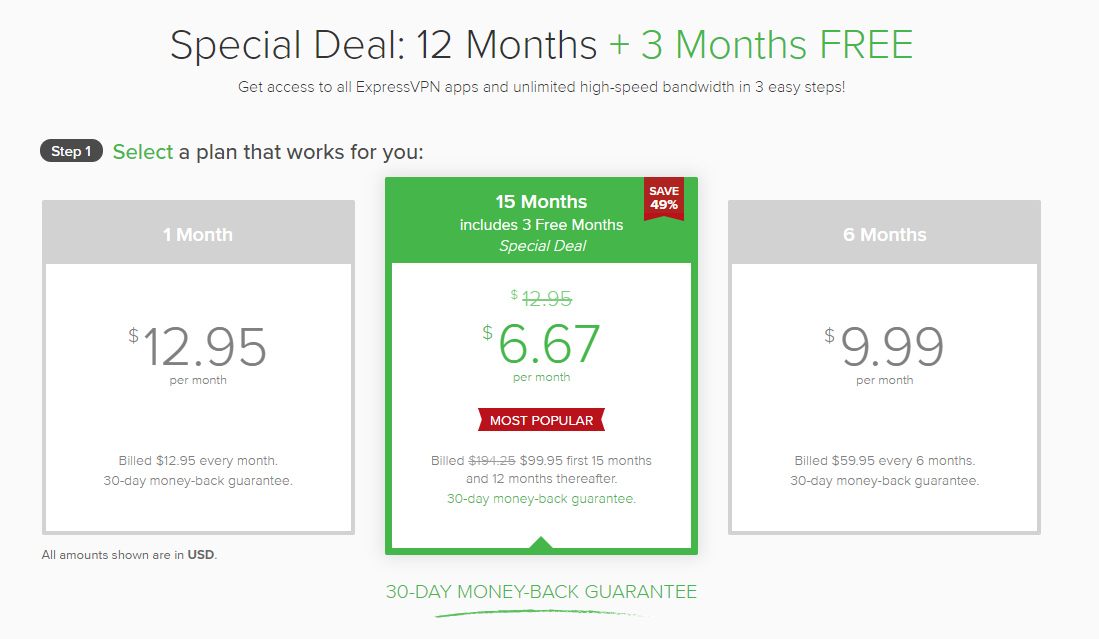
ExpressVPN’s pricing is pretty simple. You can choose to be billed monthly for $12.95 a month. You can also choose the 6-month plan, which costs $9.99 a month and the annual plan, which costs $8.32 a month, which is a 35% markdown from the original monthly pricing.
Express VPN Free Trial
Even though ExpressVPN does not have a free trial for desktops, you can download and use the iOS and Android app for 7-days free. After you’re comfortable using it and are confident that this is the right VPN for you, you can choose to pay for it in which case you get a 30-day money-back guarantee.
Is Express VPN good value for money? (talk about plans and pricing)
In our opinion, after having used ExpressVPN and many other VPNs we can safely say that it is good value for money. Sure, you’re paying more per month, but once you choose the six months or the annual plan, that’s when you start saving while using a superior product.
Speaking of superior products, ExpressVPN performed the best out of all the VPNs we retested in 2020. Not only did it connect reliably to every server we chose, but the connection was secure, the software is easy to use and most of all there are loads of security features to keep tech nerds like us happy. Furthermore, it is one of the best VPNs out there for anyone who wants to stream or download content, from geo-restricted websites.
Final Verdict
ExpressVPN is a top-of-the-line VPN service that exceeded our expectations across all platforms that we tested it on. Not only does it perform well, but they offer outstanding support, coupled with loads of privacy and security features.
The only drawback for many people reading this review is the price. While it is somewhat costlier than the competition, it’s only if you choose to pay per month. That said ExpressVPN is easier to use, more reliable and a lot more polished than any other VPN service we’ve reviewed in a while.
Our verdict is: if the price is not an issue, then ExpressVPN is the best you can get!
The Australian government has recently passed an extremely controversial legislation called The Assistance and Access Bill 2018. This is the first legislation of its kind across the globe, and it gives law enforcement agencies authority to compel tech companies to provide users’ encrypted messages.
End-to-end encryption is a code that enhances the privacy of messages being shared between individuals over online platforms such as WhatsApp, iMessage, Facebook Messenger, etc. This law essentially compels internet service providers and technology companies to build features that will allow the police to crack the encryption code when needed.
Technology industries and privacy groups have been unanimous in their condemnation of this law as it has the potential to obliterate encryption security and also undermine the Australian tech industry.
The Two Sides of the Argument
Government’s Point of View
The Australian Prime Minister, Scott Morrison, said this legislation was passed for public security. He said encryption allows “terrorists and organized criminals and … pedophile rings to do their evil work.” This has been the general sentiment expressed by the government, that this law will allow them to monitor individuals that might threaten the national security.
Critics’ Point of View
Outside the government, The law has been roundly criticized by technology companies, human rights interest groups, privacy advocate groups, lawyers, and many others. They believe that this law has gone too far and it provides an unprecedented power to government agencies to access their users’ private information. Critics are also concerned that Australian technology companies will lose clients to overseas competitors because their services will be seen as compromised and lacking in security. It is also feared that the repercussions of this legislation will also be felt across the globe as governments in the U.S., U.K., and other countries emulate the Australian government.
A Brief History of the Assistance and Access Bill, 2018
This legislation has been in contention for over a year now. Government agencies around the world have been concerned about their inability to access encrypted data in order to catch suspected law-offenders.
While debates regarding the bill had been raging for a year, the Senate rushed this bill to pass in the final sitting days of the year. The primary opposition party too caved in eventually and the opposition leader Bill Shorten agreed that delaying the legislation would threaten national security. He said,
Do I go home and say well I hope nothing happens and I hope that the Government’s politics don’t backfire on the safety of Australians? I’m not prepared to do it.
– Bill Shorten
One of the primary concerns with this bill is the creation of backdoors. Encrypted messages, as they now stand, cannot be accessed by anyone, not even the technology companies that handle the platform. As such, the only way to give government bodies access to encrypted data is to create a backdoor at either the point of sending or receipt to allow the companies to access the data. Doing this, however, risks systemic weakness as hackers and other malicious parties will be able to access encrypted data using the backdoor.
The government has been adamant in denying the creation of backdoors. However, experts remain dubious about it.
Impact on the Australian Tech Industry
Australian tech companies are concerned that this bill will be a major blow for them on the international front. Essentially, any product that is developed in Australia could be subject to modifications requiring the government to access the data without informing the clients. This will sow immense distrust for Australian products. This concern has precedence in the international treatment of Chinese company Huawei. The company was suspected of aiding the Chinese government in surveillance and data collection of their users. In fact, even Australia took a stand against Huawei and banned them from rolling out 5G networks in their country. The company has also been condemned and blocked out by various other countries. Furthermore, technology companies can now be compelled to install malware on users’ devices to get around encryption and give them access to private information without the user’s consent. Companies that refuse can be fined up to AU$10 million and individuals can be fined up to AU$50,000.
Is it still worth using a VPN in Australia?
It is yet to be seen exactly how this law will affect VPN providers. Users are naturally concerned that using VPNs in Australia will no longer safeguard their privacy because the government can simply compel the VPN companies to hand over users’ data.
However, most VPN providers have a strict “No Logging” policy. These VPN providers do not maintain any logs of their users’ activities. As such, since they don’t keep or access their users’ data, they cannot hand it over to the government. If you’re using a VPN service, be sure that they have a reliably enforced “No Logging” policy.
Furthermore, most major VPN providers are located outside major jurisdictions. So even if you use their service within Australia, they aren’t subject to Australian law and thus don’t have any obligation to cooperate with the government.
It is impossible to predict the exact specifics how this legislation will affect the future of security, but it is certainly a matter of grave concern.
DISCLAIMER: This article does not constitute legal advice, is not intended to be a substitute for legal advice and should not be relied upon as such. You should seek legal advice or other professional advice in relation to any particular matters or concerns you or your organisation may have.