Notice: Function _load_textdomain_just_in_time was called incorrectly. Translation loading for the acf domain was triggered too early. This is usually an indicator for some code in the plugin or theme running too early. Translations should be loaded at the init action or later. Please see Debugging in WordPress for more information. (This message was added in version 6.7.0.) in /home2/vpnauthority/public_html/wp-includes/functions.php on line 6170
Deprecated: version_compare(): Passing null to parameter #2 ($version2) of type string is deprecated in /home2/vpnauthority/public_html/wp-content/plugins/elementor/core/experiments/manager.php on line 132
Deprecated: Function WP_Dependencies->add_data() was called with an argument that is deprecated since version 6.9.0! IE conditional comments are ignored by all supported browsers. in /home2/vpnauthority/public_html/wp-includes/functions.php on line 6170
Deprecated: Function WP_Dependencies->add_data() was called with an argument that is deprecated since version 6.9.0! IE conditional comments are ignored by all supported browsers. in /home2/vpnauthority/public_html/wp-includes/functions.php on line 6170 Reviews Archives - VPN Authority
VPN Unlimited is based in New York and owned by a company called KeepSolid. It is your run of the mill VPN service at first glance and appears to be part of a larger suite of security-centric software. That said it still is a standalone service. So, how does VPN Unlimited measure up against other competing services? Should Australians use it? We answer these and other questions in this review.
Special Features
VPN Unlimited has a few excellent features which are worth considering when in the market for VPN software. We will take a look at a few of these features which we think will be of interest to everyone.
Netflix and Hulu Streaming: Now even though VPN Unlimited does not guarantee Hulu and Netflix streaming across all its servers we found that all servers support it. In addition to streaming Netflix and Hulu successfully, we were able to stream other services like BBC iPlayer.
A large selection of Client Apps: VPN Unlimited has apps for Linux, Windows, Mac, iOS, Android. There are also extensions for FireFox and Chrome. What’s great is the fact that these apps offer a relatively consistent experience across all platforms.
Great Customer Service: You would think that customer service should be a given, but it is unfortunate that many services don’t provide a great experience especially to customers in Australia. VPN Unlimited is different with their excellent customer service which in our experience responds within minutes. While there is no live chat feature, the quality of their ticket and email support is the best in the business. A test ticket we submitted was answered within 10 minutes which is pretty impressive. Though it still does not beat having live chat.
Privacy & Anonymity
VPN Unlimited makes sure that all traffic to and from you, the VPN server and the internet is encrypted using Advanced Encryption Standard or AES. Now for those who don’t know this is the same type of encryption used by various federal agencies when transmitting sensitive information making it the most secure type of encryption in existence today.
Sure many VPN providers already use AES-256 to encrypt data, but there is a reason why we have mentioned this as a possible pro of the service.
The extension we eluded to above was the KeepSolid Wise extension used for the OpenVPN tunneling protocol. The extension makes it near impossible to detect a user. Think of it as a cloak of invisibility.
If you happen to live in a country with an oppressive regime, where your every chat, email and online transaction is monitored this extension will help you bypass it. In Australia, your data is collected by the government and shared with other governments. Being part of the Five Eyes means that Australians can benefit from KeepSolid Wise and slip through the net making their connection to the VPN look like millions of others.
Last but certainly not least is their Kill Switch feature which will cut off data transmission in the event your internet connection is unstable with prevents data leaks.
VPN Unlimited’s Speed and Performance
In terms of connection speed, our tests show that VPN Unlimited is slow compared to the competition. It throttled our internet connection by as much as 23% at least when connecting to servers within Australia. The connection was even slower when we connected to servers in the US (30%) and Asia (40%). That said with 400+ locations in 52 countries you are bound to find a server which works for you but be prepared because it could be slower than you expect.
Ease of use (Desktop and Mobile)
All version of the VPN Unlimited’s client software work the same and are consequently easy to use. When you first launch the software, it is possible to start browsing the internet anonymously with the click of a button. The sidebar allows you to find what you want within minutes.
Despite what many advanced users may think about their simplistic interface for many people it will be welcome. The dashboard makes finding and connecting to a server in any part of the world requiring only a few clicks.
VPN Unlimited’s Servers and Locations in Australia
VPN Unlimited has servers in 400+ locations in 52 countries. While there are a couple of servers in Australia, there is no official figure for the numbers.
Customer Support
VPN Unlimited has excellent customer support. However, their support is limited to just the email/ticket system. Not having live chat like the competition means you can’t chat with a support agent in real time. That said most if not all of our questions were answered within an average span of 10 minutes.
Value for money
Perhaps there is a lot of value for money with the company’s Infinity plan for $149.99. The plan signs you up for an entire lifetime of VPN use without having to pay anything else. So, if you plan on using a VPN for the next couple of years, are on a budget and don’t care if the service logs your internet use then it is very good value for money.
Further value is added with the 7-day money back guarantee. So, you can try out the service and if it’s not something you like ask for your money back.
Our Verdict
Don’t get us wrong VPN Unlimited is a pretty decent service, but we wouldn’t recommend it to everyone. In particular, if you want a VPN that has a zero-logging policy, then this isn’t it. But if you’re looking for something cheap, yet good enough to bypass some government level snooping then it would be a good choice. The only drawback would still be its slow speeds.
Turbo VPN is arguably one of the most popular free VPN proxy clients available for iOS and Android devices. Over 50 million installs and counting is perhaps proof that this is a service that most people trust and enjoy using. However, the question is how good is this free service? And is access to nine servers across Asia, North America, and Europe enough? In this review, we will answer these and other questions about Turbo VPN.
Special Features
Streaming support: Turbo VPN claims to offer streaming support for various platforms including Netflix and Hulu. During our testing, we were able to stream from YouTube, use BBC iPlayer but Netflix and Hulu didn’t always work. However, when it did work it was only when we were connected to US servers which may be something Australians are comfortable with if they want to consume American content. Plus, there is a specific Netflix server which streams but not without difficulty. It takes a few tries to get connected to Netflix, but the servers don’t work for Hulu unfortunately.
Apps for Android and iOS: Turbo VPN has apps for both Android and iOS. Both apps have the same interfaces, and so they are inherently easy to use.
Free to Use: Perhaps one of the biggest draw for Turbo VPN is it being free. Most people start with a free account and then upgrade if they like the service. Unlike other competing services you know what the service has to offer before paying for it.
Privacy & Anonymity
Turbo VPN does not make any tall claims about its privacy and anonymity abilities, the reason being that they are based in China. So, they indeed maintain logs. According to their privacy policy, the company does collect and store a small amount of information about users.
The company states that they don’t collect information regarding the user’s IP address, the website they are visiting when using Turbo VPN, and a few other bits of information. However, as sticklers for privacy, we have a couple of issues with their privacy policy. For starters, they say that the company collects user statics, i.e. their location and behavior but don’t elaborate on it further. We see this as a justification for logging. Location information is directly tied to an IP address, and so this statement runs contrary to an earlier statement where they state that IP related information is not collected.
Turbo VPN’s Speed and Performance
The speed and performance we experienced was below average. On average Turbo VPN was throttling our internet speeds by 55%. Though we got the best speeds when connecting to a US server. The slowest speeds were observed when we connected to servers in France, Germany, and Netherlands.
Ease of use(Desktop and Mobile)
One of the best things about Turbo VPN is their modern looking app design which is simple to use, aesthetic and overall pretty to look at. Clicking on the symbol on the right opens up a list of all the servers, a flag represents each location. You also see a list of so-called premium locations which is just another way of saying that they are servers you can use if you pay for them. Though you can click on the tab that says “free” and only see a list of free servers.
Clicking on the burger menu brings up the settings. Though there isn’t much here as you’re limited to just choosing whether you want the app to connect upon startup. Other than that there isn’t much to see or do here!
Turbo VPN’s Servers and Locations in Australia
Unfortunately, Turbo VPN does not have Australian servers. After all, you only have access to just nine servers.
Customer Support
Non-existent customer support sums up what you can expect. There is no live chat, or ticket based support system even if you are a paid user. We tried reaching out to the company via their Facebook page. Sent a message, which was seen 24 hours later and still didn’t receive a reply. So, it is fair to say you’ll be reasonably frustrated with the service if you run into issues.
Value for money
Turbo VPN is free for the most part, but the value it offers is nothing compared to the privacy issues with the service. The paid service is a big no! Again mainly because they don’t have any form of customer service and their privacy policy is blatantly conflicting.
Our Verdict
Turbo VPN certainly appears to tick all the right boxes on paper. You get a number of useful features and for no price whatsoever. However, the service is as many suspect feeding off your private information. The fact that their privacy policy is so confusing and contradictory is a red flag in itself. Plus it being based in China is another potential red flag since everyone knows that Chinese businesses are answerable to the Chinese government. Finally, a lack of customer service and slow overall speeds is a huge turn-off. We can’t recommend Turbo VPN to anyone, not even if its free.
PureVPN has been around since as far back and 2007, which why we are not surprised by their claims of having 2000+ VPN servers in 180 locations. In addition, the service claims to offer an array of protocol choices, DNS support, IPv6 leak protection, and torrent support. Other features include a smart kill switch, Bitcoin payment, split tunneling and the ability to connect up to five devices. Though our question and the question many people have asked us is how good is the service in real-world use? That’s exactly what we’ll attempt to answer in this review.
Special Features
Streaming Support: PureVPN makes an extra bit of effort to unblock websites like Netflix and Hulu for Australians. It supports streaming with specific apps which means that you can use the Netflix, Amazon, and Hulu app for instance to stream content. In most cases, the streaming worked perfectly, but there were exceptions like when we tried using the BBC iPlayer app. Besides if one server does not support streaming the content you want, switch to another there are more than enough to go around.
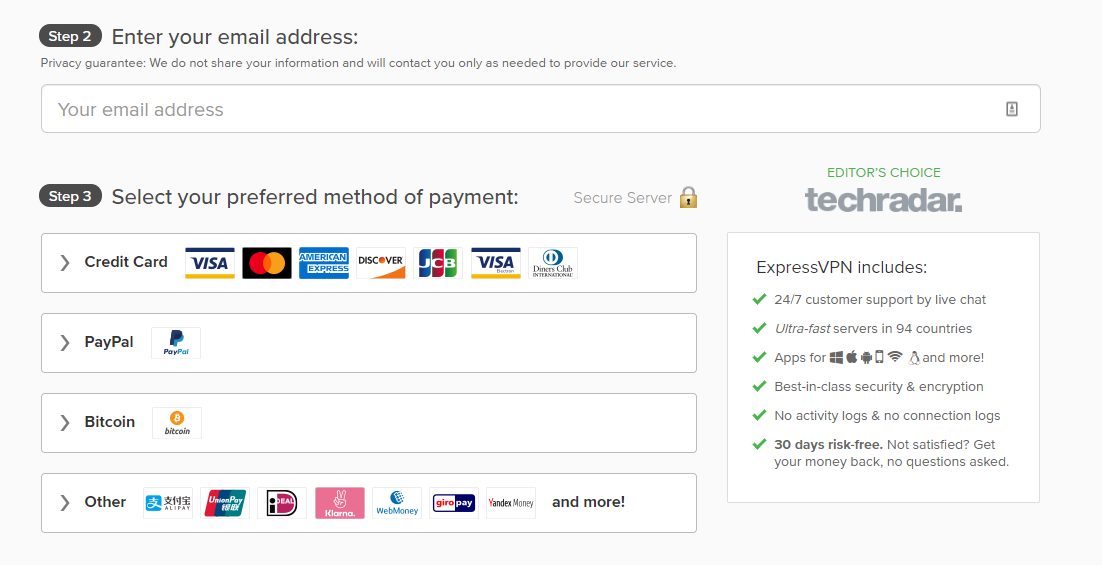
Supports Many Payment Methods: While not a unique feature in itself being able to support numerous payment methods ensures that everyone can use the service. However, what’s interesting is that PureVPN supports paying for the service using Bitcoin, which is a cryptocurrency and can’t be traced to a user. That’s, in addition, to support for Credit Card, Alipay, gift cards, PayPal, etc. in addition to 150 other payment methods via the paymentwall platform.
Dedicated apps for various platforms: Pure VPN has dedicated apps for iOS, Windows, Android, Mac, Linux and even extensions for Firefox and Chrome. It is also possible to install PureVPN on Android TV, Kodi, Firestick and various routers.
Privacy & Anonymity
Privacy and anonymity are one of the biggest concerns for people who use VPNs. PureVPN has over the years made a big deal of their so-called zero logging policy which meant that they didn’t record your online activity. Though the small print always said that they did log some stuff including your connection time, incoming IP address and the bandwidth used.
The company has since addressed this in a blog post saying that it didn’t keep complete logs like browsing history and so they aren’t doing anything in violation of their own privacy policy. However, it does not amount to having zero logs. Plus, many people may not be comfortable with PureVPN logging and storing their real IP address which can be traced back to the ISP and its location which in other words means that their privacy isn’t great. Though it is possible to remain anonymous online when using their service except for perhaps from the authorities.
Pure VPN Speed and Performance
PureVPN may boast of blazing fast connection speeds, but in our experience, they are nothing to brag about. While better than the slowest services they still aren’t amongst the best. On average Australians will see a 20% drop in speed when connecting to a server on the Australian continent like New Zealand. Though the further they go from there the speeds will slow down exponentially. For instance, our connection to the US was 35% slower; Japan was 40% slower. Some European servers didn’t work but those that did slowed down our connection by 45%.
Ease of use (Desktop and Mobile)
PureVPN, for the most part, is easy to use across mobile and desktop devices. Though the mobile version of the software limits users to a handful of features which are just one tap away. On the desktop app though you can drill down into more advanced features and choose things like the encryption algorithm and connection type.
Pure VPN Servers and Locations in Australia
While the company boasts of having over 20 servers in Australia, we could only see 4. Now that could be because those servers were down or maybe because the company removed them and that figure wasn’t updated on the website.
Customer Support
The interesting thing about the support link is that it does not take you to the website but instead opens up a support section from within the client. Here users can open a support ticket. But in most cases, the support isn’t very helpful, but they are certainly polite.
Those in a hurry can use the live chat option on the website. It takes around 5 minutes to connect with a live person. However, most responses were canned and the suggestions weren’t much help beyond reinstalling the software or to download it again. We suspect that like us many users who find themselves needing assistance will be frustrated with the support.
Value for money
PureVPN does offer a pretty long list of features. However, in practice, few of these features can be used. The slow speeds, unhelpful support and the fact that their piracy policy is very elastic lead us to state that they are not providing good value for money.
Our Verdict
PureVPN comes with many powerful features rivaling its highly rated and well-reviewed competition but for a competitive price. However, our experience during the time reviewing the service shows that all of these don’t work as you’d expect it to. There are usability, support and server issues to deal with for the most part. It is perhaps for people who can put up with flexible privacy standards, slow speeds, and low-quality customer service in exchange for a low price. We suspect that most people will cross PureVPN off their list of considerations mainly because they don’t want to deal with the frustration of slow internet speeds.
Avast SecureLine is often referred to as Avast VPN. As the branding suggests, the SecureLine is a VPN product by the popular security vendor we all know and love called Avast Software. That said the true belly of the beast here is HideMyAss which is owned by Avast.
Interestingly the feature set offered by Avast SecureLine isn’t anything out of the ordinary. They have an averaged size network spread across 55 locations in 34 countries, with P2P supported in 8 of those locations. The company has client software aka apps for Mac, Windows, iOS, and Android operating systems. Though the question is, does Avast SecureLine offer something more than just a basic VPN experience and if so who is it best suited for? We’ll attempt to answer these and other questions in this review.
Special Features
Geographically Diverse Set of Servers
Sure! Avast SecureLine does not have an impressive number of servers like its competition. However, the servers are cleverly spread out across six continents. So, there are 55 server locations in around 34 countries. The servers are spread across large cities in the US, Australia and other parts of the world.
Minimalistic Interface
Perhaps one of the most unique aspects of SecureLine compared to the competition is just how uncluttered and straightforward the interface is for the most part. The installation is quick and simple. The app is so light it took us just 4 seconds to download and 3 minutes to install. When you fire up the app on Windows, Mac and mobile devices, you’re greeted by a minimalistic interface that anyone can use but which is unfortunately devoid of any advanced features.
Works perfectly with Netflix (US)
Australians who want to watch American Netflix will find that Avast SecureLine’s four servers which according to them are optimized for streaming works perfectly. There is one server in the UK, three other in the US. We also found a presumably virtual server named Gotham City too.
Privacy & Anonymity
Avast supports the well encrypted and secure OpenVPN protocol which uses the AES-256-CBC putting the service amongst the best when it comes to privacy. However, users have no control over the settings of the protocol, and there aren’t any protocols supported. Plus, there is no leak protection, kill switch, and various other privacy-related features we’ve grown to love and appreciate from other services.
In our books not having all those fancy features isn’t necessary since SecureLine does cover all the basics. We tested the service, and it did prevent WebRTC and DNS leaks quite efficiently. Preventing these leaks is good since it helps keep our identity anonymous online.
Figuring out Avast’s logging policy was a whole different story. Whether or not they keep logs is part of a 20,000-word document called their Privacy Policy. Though we eventually found that Avast states that the VPN service does not record browsing history or monitor users’ activities. But they do store a time stamp as well as an IP address each time you connect and disconnect from the VPN service. Plus, the amount of data uploaded as well as downloaded during a session is tied to your IP address which is stored on the VPN server.
Arguably this isn’t necessarily alarming if you’re using the VPN to watch Netflix or YouTube clips which are only intended for a US audience. However, if you’re downloading torrent files or uploading sensitive information to a personal server all of which can be traced back to you.
Avast VPN Speed and Performance
One of the most significant issues for us with Avast SecureLine is the lack of OpenVPN configuration files. So, that means we were not able to run our usual battery of tests like in other reviews. That leads us to use the manual approach, which requires manually connecting to each server through the app and then running tests using Fast.com and SpeedTest.net.
Even though we are not sure how many Avast SecureLine servers are based in Australia and New Zealand we did manage to connect a few times. Average speeds on our 10Mbps connection were around 7Mbps which is pretty decent all things considered. When connecting to servers in Western Europe, the speeds dipped to an average 4Mbps, and 3Mbps when connected to Eastern European VPN servers. The most problematic and slow were the servers in Poland.
Speeds, when connected to American servers, were a smooth 6Mbps on average which is unexpected considering the distance and latency issues we’ve faced with competing VPN services.
VPN Servers in Malaysia and other countries in Asia didn’t yield any better than 3Mbps on average.
Ease of use (Desktop and Mobile)
Desktops
The one thing Avast SecureLine gets right is ease of use on Desktops. Apparently, the interface was designed for someone who had never used a VPN before. The huge arrow draws your attetion to the ‘Connect’ button. Simple buttons indicate what they do like encrypt your online connection when the VPN is turned on and your current location as it appears to others.
Mobile Devices
On mobile devices, SecureLine is a mirror image of its desktop counterpart. Connect and subsequently disconnect with a single tap. The only noteworthy addition being the auto-connect feature. The feature works by auto connecting each time you’re connected to a Wi-Fi connection that’s otherwise not on your whitelist like the home or office connection.
Avast VPN Servers and Locations in Australia
Avast SecureLine does not have a specific number of Australian servers stated in its app, website or user manual. Though in our estimation it is around 4-5 servers across Sydney and Melbourne.
Customer Support
Apart from a couple of articles, an online forum, the only way to contact support is by filling in their online form. The company states that they take around two business days to respond.
Value for money
Not the best VPN service for the price. So, to us, it does not offer good value for money.
Our Verdict
Avast VPN is only a worthy consideration for those who want something that’s very easy to use and don’t mind the lack of features, support, and a complicated pricing system. Though everyone else should stay away from it.
PIA, short for Private Internet Access, is a United States based VPN service that offers a range of features, including an ad blocker, at an extremely cheap price. In fact, it’s one of the cheapest VPN services on the market. However, the biggest drawback it has to contend with is that it falls within the “5 Eyes” jurisdiction known for their violation of online privacy.
PIA VPN Special Features
PIA MACE: This is one of PIA’s best features. This feature can automatically block all malware, trackers, advertisements, etc. As such, you can browse the internet without interruptions and without worrying about accidentally clicking on malware files.
Kill Switch: This feature is extremely useful if you’re accessing sites that are forbidden by the government. Sometimes, due to connectivity errors, the VPN connection is lost. In those cases, this feature will automatically disable your internet so your activities are not discovered.
Netflix Unblocking: Bypassing Netflix’s geographical restrictions is considered the gold standard in terms of IP concealment. PIA does allow users to bypass Netflix’s restrictions and access content from other countries, but only via a limited number of servers.
Privacy & Anonymity
PIA is owned by an American company called London Trust Media, Inc. There’s little no information available on that company, which, in itself, is a pretty big red flag. That instantly means this company isn’t very transparent, and, consequently, not trustworthy.
Furthermore, the United States is a part of the “5 Eyes”, i.e., one of the 5 worst countries in terms of online privacy. This is true for the following reasons:
They conduct mass government surveillance via NSA.
Companies like Google, Facebook, Verizon, etc, conduct mass corporate surveillance to derive user information.
The Digital Millennium Copyright Act has troubling connotations for online security and user privacy.
Many large technology companies work with the government and provide user information when called upon to do so, without informing their users.
For all of the aforementioned reasons, we’d say that PIA VPN doesn’t offer a lot of privacy and anonymity.
They do claim they follow a No Logging policy on paper. However, we have no way to know how far that policy is enforced. Furthermore, they also limit the user’s subscriptions to 5 connections. The only way for them to impose this limitation is to keep some logs of user activities. As such, being in the US, we simply cannot trust their No Logging policy.
In terms of encryption, they are set up with a 128-bit AES encryption by default. However, you can go to the settings and change that to 256-AES encryption as well. The authentication can also be secured using SHA-1 or SHA-256 encryption. Furthermore, the client devices are also set up with RSA-2048 public-key encryption that can be upgraded to RSA-4096. As such, we have no complaints about the level of customization offered in terms of encryption.
PIA VPN Speed and Performance
PIA is not equipped with a server status page. This is yet another one of its transparency issues. As such, you cannot check the real-time bandwidth during connections. Connecting through different servers gets you different results and at different times of the day. As such, it’s pretty unreliable, and just okay at best.
Ease of Use (Desktop and Mobile)
PIA is extremely easy to use both in Desktop and Mobile. The app is user-friendly and intuitive. There’s a small icon that suggests privacy. You simply have to click on it and you get connected.
To select the server, you have to click on Region Selection in the main dashboard. This will give you access to the flags of all the different countries with server locations. You simply have to select the server you want to connect through and that’s it!
PIA VPN Servers and Locations Across Australia
PIA offers 3193 VPN and proxy servers located in 52 cities across 33 countries. Out of that, they have 185 servers distributed between two Australian cities — Sydney with 103 servers and Melbourne with 82 servers. This isn’t as impressive as various other VPN services that have servers in 3 or 4 Australian cities, but it’s still not bad.
Customer Support
PIA arguably has the worst support amongst all legit VPN services. If you go to online PIA forums, you’ll find hundreds of users complaining about lack of response from the support team. Comments like “Is PIA busy” littered the forum, showing a general lack of accountability.
In defense, PIA has stated that they are updating their systems and this is a temporary issue. We’ll have to see if this issue persists.
Value for Money
PIA is undoubtedly the cheapest VPN service on the market. If you get their service for 24 months, you can get it for as low as $2.91/month. They don’t offer any free trials but they do offer a 7-day window for a complete refund.
While PIA might be the cheapest VPN on the market, it’s also bogged down by various privacy concerns. If that is not an issue for you, this VPN will be highly valuable for you. However, if privacy is a major concern when using VPNs, even this cheap price wouldn’t be worth it.
Our Verdict
PIA is one of the cheapest VPN services on the market with a wide range of features and it’s extremely easy to use. However, it has terrible customer support and their location within a “5 Eyes” jurisdiction is a matter of grave privacy concern.
Most people who are new to VPNs and would like to dip their toes into the technology will be tempted to test out Opera VPN. It is Opera browser’s built-in VPN service that does not require installing any additional software, creating an account or even being eligible for a credit card! Users get unlimited data, and it seems to do well with streaming Netflix too. So, what’s the catch? Our review actually stumbles across quite a few catches that users should be aware of before they start using Opera VPN.
Opera VPN Special Features
No Additional Software Installation Required: Using Opera VPN does not require you download and install any additional software. All you need is to Opera Browser, and then just turn on the VPN feature. However, turning off the VPN feature does not in any way hinder the otherwise brilliant browser’s performance.
No Bandwidth limitation: Opera VPN does not have a cap on how much bandwidth you can use unlike other free and trial services. So, regardless of if you want to stream HD content, or browse through geo-locked websites, there is no fear of being locked out as soon as the data cap is reached.
Privacy & Anonymity
Now for starters calling Opera VPN, a VPN service would be technically incorrect. It is technically a secure proxy service which means that even though it does encrypt the browser’s traffic to and from websites, it isn’t moved through a tunnel server the way it is with VPNs. VPNs encrypt every piece of information as opposed to Opera’s HTTPS/SSL encryption which is only for websites accessed through the browser.
While Opera VPN will not reveal your real IP address to websites making it possible to visit geo-blocked content or geo-specific content, it isn’t all that anonymous. Opera VPN’s Privacy Policy tends to be pretty clear about how they store and log information. According to the company, they administer a unique ID to each user which tracks how the VPN service is used, how often it is used, the environment in which it is used and the session activity. However, they claim that the ID isn’t linked to your device or personal account, but we’d need to take their word for it. Opera VPN also logs other information like app crashes, platform, memory data, operating system, etc. all of which they claim is used to improve product experience.
Opera VPN Speed and Performance
We tested Opera VPN’s speed and performance across a multitude of countries, i.e. within Australia, the US, Europe, and Asia. Each time we disconnected and reconnected to a new country’s proxy server. We used Speedtest.net to test the speed, and averaging out the results of three tests per country. To ensure that we know how much speed we are losing when connected to Opera VPN we took baseline tests which were at 10Mbps.
When connecting to proxy servers within Australia we received an average of 5Mbps, in the US, it was around 4Mbps, European servers gave us 3Mbps with Asia being the worst at hardly 1Mbps. The overall drop in speed was between 70% to 90% for the most part.
So how bad is the speed that Opera VPN offers? Well pretty bad. To put things into context the slowest VPN service we’ve tested capped our download speeds at 30% lower than baseline. Opera VPN slowed it down by 70% at least. Now for us that does not mean a lot since we are on Australia’s most expensive broadband connection but for the average Australian using 4G or 3G or even a 5Mbps home network WIFI connection, the speed will be frustratingly slow.
Ease of use (Desktop and Mobile)
Opera VPN’s service is limited to laptops and desktop computers only. The mobile version of the feature was shuttered in April 2018, after Symantec purchased SurfEasy.
Getting online using Opera VPN is pretty simple. Just click on the browser’s logo, on the top left of your screen, choose settings and go to Privacy & Security, then click on Enable VPN. A few seconds later the Opera browser’s logo will turn blue indicating that you’re now using their VPN. Also, the interface will show your current IP address and how much data is being transferred.
Opera VPN Servers and Locations across Australia
Unfortunately, since Opera VPN isn’t technically a VPN, there is no way of knowing how many servers they have. After all, it is a proxy service which means that they could just be using one server to run the entire service.
Customer Support
No customer support beyond just a few FAQs and troubleshooting guides.
Value for money
It’s free, so the only value it has is of your time. If your time is valuable, then don’t waste it on Opera VPN’s sluggish performance.
Our Verdict
Sure, the Opera VPN is free to use with unlimited data and pretty decent video streaming via a series of proxies, but its awful network performance makes it difficult to recommend. When compared to similar services like those of ProtonVPN which is slowed down on purpose for free account holders, it is still faster than Opera VPN. So, unless you like sitting around waiting for websites to refresh and videos to load, it being free does not matter.
When
most people subscribe to a VPN service,
the assumption is that they will be connecting to highly secure, well-managed servers which are tightly
integrated to ensure optimum security. All of which means that access to their
traffic, for the most part, will be near impossible. However, that’s not how
HolaVPN works.
Based
in Israel HolaVPN is described by the company behind it as being so-called community powered, i.e., Peer-to-Peer. The software allows users
to choose a country through which their traffic can be routed. Currently, there
are 33 countries from which to choose. However, unlike a conventional VPN, your traffic
is routed through other people’s computers and not Hola’s network. So, the billion-dollar
question is how well does it all work? That’s precisely
what we’ll attempt to answer in this review.
HolaVPN Special Features
Free Browser Extensions
One
of the best features of Hola is that the browser extension is free for home
users or non-commercial users. There are no data caps or speed caps. However,
because it uses a P2P architecture, you’re using as much bandwidth of other
nodes as they are using yours. Though Hola
claims that the average daily traffic to any one particular node is equivalent
to just a 20-send YouTube clip.
Does not use nodes running on
battery
Hola
says that the software only uses nodes or computers as peers if they are
completely idle. Also, if they are not running
on battery power. So, there isn’t going to be any noticeable difference
in operation.
Low Price
Compared
to other VPN service providers Hola is a lot cheaper. One reason for that is
perhaps the service does not need to pay for an
extensive network of VPN servers, and
so the savings are passed down to the end user.
Privacy & Anonymity
Hola’s
comparatively low price shouldn’t
distract you from the numerous privacy and security issues that it poses.
People
who are using the free browser extension should be concerned with the fact that
if their computer becomes the exit node for someone who is hacking, spamming or
engaging in some other illegal activity, it is their IP address that’s recorded. However, those who are
uncomfortable with that happening can upgrade to Hola VPN Plus.
Interestingly
Hola Plus isn’t going to solve all your problems. The company keeps quite about the encryption algorithm it uses
and states that depending on what users choose only some of the traffic may be
encrypted.
We
browsed through the Hola VPN’s pages and found the Windows 10 manual in which
the company states that they recommend connecting using a PPTP protocol. The
PPTP protocol is outdated and known to be insecure which is why many premium
VPN services don’t support it.
Hola
VPN isn’t shy to state that they do monitor user activity on the network and
possibly even log it. Not to mention that they
collect a great deal of information about users’ activities. So in an
industry where no-logging policies are taken
for granted by those worried about their privacy and security, Hola VPN does exactly the opposite.
Now
for someone who wants to access geo-blocked websites and YouTube videos all of
this shouldn’t be very alarming. However, if you value anonymity, then Hola VPN isn’t the right choice.
Hola VPN Speed and Performance
The
fact that Hola routes traffic from users’ computers means that you’re bound to
run into all kinds of issues with speed and performance. However, contrary to
what we went in believing the speed isn’t
always slow. We used SpeedTest and Fast.com to check speeds when we connected
to nodes in Australia and New Zealand. In some cases,
the speeds were much better than other
commercial VPN services. Using a 10Mbps connection we were getting a stable
7Mbps when connected to Australian Nodes. That said one reason for the excellent speed is that the service isn’t
applying a layer of encryption over the traffic like other VPN services.
When
connected to European and American nodes the results weren’t consistent. On
average we got around 4Mbps. Yes! You won’t be able to stream HD video
uninterrupted but if that’s a concern you shouldn’t be on a slow connection
anyway.
Ease of use (Desktop and Mobile)
Desktop
Windows
and Mac users will mainly be greeted by a
Chromium-based app which fires up with a
location picker. You can choose to connect to the UK, US, Australia in addition
to 33 other countries. However, you don’t get any information regarding node
availability, city information, ping times, etc.
The
app does not send a desktop notification
telling you if the VPN has disconnected. However, the app’s icon in the system
tray does show the current location’s flag and if you click on it the IP
address.
Mobile Devices
The
iOS and Android versions of the service do not have many features either. The
app works as a sort of launcher for other apps on your mobile device, and you can specify a location associated with
them. For instance, you can launch the Chrome browser with a US location and
the Firefox browser with a UK location. You also get the option to change your
GPS location to match that info.
Hola VPN Servers and Locations in Australia
Apart
from mentioning that they have servers in 33 countries, the app nor the website
specifies the number of servers in each country. That could be because the figures vary. So, there is no way of knowing how many local Australian servers users will have
access to except that you can connect to servers in Australia.
Customer Support
Support
is virtually non-existent. Apart from being able to email and glance through
the repository of information on the official website.
Value for money
We
would say that despite being comparatively cheap,
it offers the worst value for money compared to competing services.
Our Verdict
Hola
VPN is free and ideally suited for people who want to unblock otherwise geo-locked websites. While people would expect
better encryption and more security from the paid version of the service it is
unfortunately non-existent. Plus, throw lots of logging into the mix, and this is a service we can’t recommend.
CyberGhost
is one of the few VPN services that we have watched morph from being geek-centric to user-friendly. Perhaps the
company realizes that VPNs are no longer the realm of just computer engineers
or those fringe privacy advocacy groups. With over 1700 servers located in 60
countries across the world, the Romania
based CyberGhost has a strict no-logging policy putting it beyond the reach of
law enforcement agencies. Not to mention the fact that it is arguably one of
the best services for people who want to surf the internet in Australia without
Big Brother watching their every move.
In
this review, we’ll dissect CyberGhost VPN
to reveal if it worth considering for Australians who want an extra layer of
privacy when connected to public networks, and their home internet alike.
Special Features
Unblocking Streaming Services
We’ll admit that many other VPN services tested over
the months claim to be able to unblock Netflix and Hulu. However, in reality, CyberGhost VPN is one of the few that
makes it possible. We tested CyberGhost’s ‘Unblock Streaming’ feature and were
easily able to unblock American Netflix and UK’s Netflix. That’s in addition to
specific servers for streaming services like BBC iPlayer, Hulu, Crunchyroll, etc. All of these worked flawlessly during our
testing.
Choose WiFi Specific
Security
Another nifty little feature is CyberGhost VPN’s
ability to identify individual Wi-Fi networks and apply a predefined set of
privacy features. For instance, CyberGhost VPN installed on your mobile device
will automatically encrypt all traffic when connected to an airport’s VPN but
will not encrypt traffic when connected
to the home network. Advanced settings allow
users also to add exceptions for specific
programs so the traffic to and from which will not be encrypted or pass through
a VPN server.
AD Blocking
AD Blocking is another excellent feature that works
flawlessly. Not only that but it will block websites with trackers and malware.
There is also the option of enforcing HTTPS rules. While CyberGhost isn’t the
only VPN service to provide Ad Blocking, it does have the lowest instances of
false positives.
Privacy & Anonymity
To
start with CyberGhost VPN uses what it calls military-grade
encryption. However, the ‘settings’ menu on the app allows users to choose
either OpenVPN, L2TP, IKEv2 or leave it on Auto. By default, we found that the software uses OpenVPN in most cases.
Plus,
they proudly boast of having a “strict no logs policy.” We read through CyberGhost VPN’s Privacy Policy page, and it does appear that the claim is more than
just marketing speak. Not having logs tied to your IP address means that
security agencies and law enforcement have no way to knowing for sure what you
were doing online. The same goes for hackers and corporate spies.
Speed and Performance
Now
before we go into discussing the speed and performance of CyberGhost VPN, it is essential
to mention that measuring performance reliably
is difficult. Many factors influence the speed
and performance of a VPN that said we ran speed tests by connecting to multiple
servers. We also used multiple speed
measuring services, i.e. OpenSpeedTest,
Fast and SpeedTest.
We
connected to servers within Australia and New Zealand which delivered the best
speeds averaging out at around 8Mbps on an otherwise 10Mbps connection.
When
connecting to servers in America, the
speed took a bigger hit. Our connection to a server in Washington clocked in at
6Mbps on average with the lowest being around 5Mbps. The same was the case with
servers in Europe clocking in an average of 6Mbps. The slowest speeds were from
servers in Eastern Europe which measured an average of 4Mbps.
Connecting
to servers in Asia slowed things down even further with the average speed in
Japan being 2Mbps. However, it is to be expected
as distance increases latency which in turn affects speed. So, Australians who
want the best speed may want to stick
with servers on the continent.
We
firmly believe that your mileage may vary
but not be too much from what we experienced. However, the majority of
Australians are not on a 10Mbps connection which is why apart from browsing the
web the slow down associated with trying to stream US Netflix will be
noticeable. That said if all you want is to browse the web, send emails and
chat with business partners securely the drop-in speed will not matter a lot.
Perhaps you may want to try out the service before buying.
Ease of use (Desktop and Mobile)
Desktop Experience
CyberGhost
VPN is optimized for Desktop operating
systems like Mac and Windows. It is straightforward
to use, and all the advanced features are
just a single click away. If anything it is a frustration-free
experience compared to the competition with often complex interfaces.
Mobile Apps
iOS: CyberGhost VPN’s iOS app is quick
and simple to use thanks to the big and bold ‘Connect’ and ‘Disconnect’ button.
It connects to the fastest and nearest server by default. Though you can also choose a location by tapping on the location
tab. You can see the number of people connected to each server and save a location to the ‘Favorites’ list.
Android App: on Android devices, the CyberGhost VPN app works
differently but not necessarily in a good way. You are not prompted with your current WiFi network like it is on the
iOS app. You also don’t have a Favorites list and can’t see the number of
connected users to each server. However what you do get are a couple of web
filtering options not available on the iOS version of the app. You can also
block trackers, malicious websites and compress data.
Cyberghost VPN Servers and Locations
1700
servers located in 60 countries across the world. Out of which 53 servers are located in Australia, namely Brisbane, Sydney,
and Melbourne.
Customer Support
Apart
from a massive library of information
subscribers can chat live with a support professional or send them an email.
Unfortunately, the Live Chat feature is buried deep within the website and
requires you click the ‘Help’ button located on the bottom right, then enter a
phrase to search the knowledge base, and only after that do you see the ‘Chat’
button. Once you do connect with a support person the response is quick and, in
our experience, they were knowledgeable.
Value for money
It
indeed isn’t the cheapest VPN service out
there, but it isn’t the most expensive
out there either. That said when it comes to value for money, we’ll rate it 6
out of 10!
Our Verdict
CyberGhost VPN is a very easy to use, robust and secure VPN service that’s worth considering by regular people and businesses alike. Most people will find the Netflix unblocking, Bitcoin support and live chat to be major draws to the service. Perhaps the only drawback is consistency across iOS
ExpressVPN has over the years attracted a lot of praise for being fast, stable and highly secure. However, does all of that merit the slightly higher price that users have to pay? While Express VPN has evolved over the years, today it is touted as being amongst the best services out there. The question you’re probably asking is, what does ExpressVPN offer to Australian users that others don’t?
In this review, we’ll go into what features make ExpressVPN stand out and if it is all worth the extra you are paying for it? By the end of this review, you should be able to decide if this is the right VPN service for you.
Top ExpressVPN Features at a Glance
Now before we go into details, we’ll start with the top features that make ExpressVPN stand out. We’ll go into a little more detail of each in subsequent sections below.
Blazing Fast Speed – Now this is one feature we’ve heard a lot about, and our testing shows that there is something to it. We tested ExpressVPN, and found that the speeds are great, the results of which we’ve posted in the ‘How Fast is Express VPN’ section below. We conduct extensive testing from our Australian base on all VPN services we review.
Highly Capable Browser Extensions – ExpressVPN’s selection of browser extensions for Firefox, Safari and Chrome are not halfhearted efforts, but full-blown add-ons that enrich your experience.
Stream Netflix with Ease – ExpressVPN allows you to stream US Netflix as well as from other regions easily. We tested this for ourselves, and the results were remarkable.
A Wide Selection of VPN Servers – ExpressVPN has servers in 160 locations across 94 countries. So, there is no shortage of servers regardless of what region you choose.
How Fast is ExpressVPN?
ExpressVPN is, without a doubt, one of the fastest VPN services on the planet. However, not being ones to take the company’s word for it or the word of other reviewers, we decided to put that claim to the test from our office in Perth using an NBN connection.
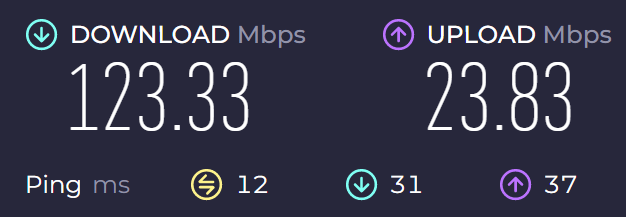
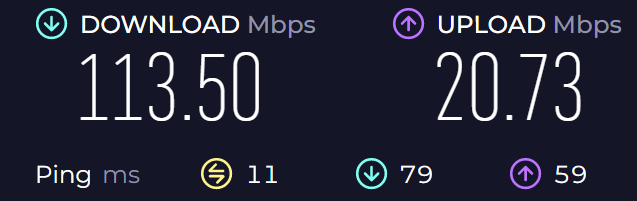
We ran multiple tests and for each location assuring that these aren’t one-off figures. Below are the screenshots from our tests.
Base Internet Speed without a VPN
We kicked off our round of testing with a base speed test, which capped out at a decent 47.73 Mbps. That was followed by a series of tests by connecting to servers across Australia, including one right here in Perth.
Connected to a Server in PerthConnected to a Server in SydneyConnected to a Server in Docklands
We then decided to test the speeds of ExpressVPN’s international servers connecting to a server in San Francisco, USA and another in Singapore. As you can see below, there was hardly a megabyte of difference in speeds on average compared with connecting to servers in Australia. This result is remarkable considering that most other VPN services generally throttle speeds by as much as 20% – 35% of their original base speed.
Connected to a Server in San Francisco, USAConnected to a Server in Singapore
The one thing we are unable to explain is the dismal upload speeds when connected to the server in Singapore. We assume it has something to do with the way that server is configured or because it might have been under heavy load each time, we reran the test.
Apps and Extensions
ExpressVPN has a compatible app across for just about any device you can think of or perhaps use. However, ExpressVPN’s full capabilities are only available via its desktop app (Windows and Mac). Sure there are apps for iOS and Android, but during our testing, both apps weren’t as feature-filled as their desktop counterparts. The Windows and Mac version of the ExprssVPN app is like it’s from another planet.
Express VPN’s iOS and Android Apps
The Android and iOS apps can be installed from the Google Play or App Store, respectively. Configuration, for the most part, is automatic. You say ‘Yes’ to a few security measures, set up a couple of preferences and choose a server to connect with. The ‘Auto-Connect’ feature allows you to connect with the best server that the software finds at random when your mobile device is fired up.
While the initial setup on iOS and Android devices is the same, they differ a bit, from each other in the way of features. However, none of these apps has all the features you’ll find with their desktop counterparts.
Now for starters, there is no Tor compatibility on a mobile device. So, there is no way to get added Tor privacy, which is not something most people will need or even know about but not having it will certainly be missed by techies like us.
The IPv6 leak protection, while available on mobile devices, does not work as well as it does on desktop devices. There was no way to tell when IPv6 was blocking traffic, which made it hard to use.
ExpressVPN’s speed test isn’t available on mobile devices, so you can’t test it for server latency and overall all download speeds. Though we must admit, connections are reliable. We didn’t experience any buffering during our tests and lags were nonexistent too. In fact, most people like us will find that ExpressVPN’s mobile app is a lot snappier than its desktop counterparts.
iOS users can choose between IPSEC/IKEv2 and OpenVPN protocols. However, because Android only supports OpenVPN, that’s the only choice. Fortunately, OpenVPN is the highest standard and the only protocol that 99% of users will ever need.
Chrome and Firefox Browser Extensions
ExpressVPN has a very good dedicated browser extension for both Fox and Chrome. Both browsers together make up 80% of the market. However, it would have been great if there were similar extensions for Microsoft Edge and Opera, both of which are now growing in popularity amongst security-conscious users.
Circling back to the apps, these do a fantastic job of encrypting traffic that goes through the browser. So, almost everything you do is encrypted. It is like a split tunnelling feature, with the only difference being that you don’t need to have ExpressVPN’s desktop app turned on for it to work.
The add-on can be installed directly to Chrome or Firefox and is a handy feature for people who find themselves using a public WiFi connection like at a local coffee shop.
Router App
We like the fact that ExpressVPN has an app that can be installed and used on routers. Installing the app on your router will protect every device in your home, or that’s connected to that router, even if they don’t have ExpressVPN installed. So, traffic to and from your TVs, tablets, mobiles and games are pass through ExpressVPN’s app installed on your router.
Setting up the app on your router requires going through a couple of quick steps. You can choose your specific router from ExpressVPN’s website, and then you’re provided with an installation guide for that router.
If your router isn’t listed, it is still possible to manually configure the VPN on your own. However, doing so will mean that you miss out on important security updates and present features if the app isn’t configured correctly.
The router app also allows you to configure which devices don’t use a VPN. Those settings can be tweaked via the ‘split tunnelling’ feature, which will enable you to add or remove devices within minutes.
Using Express VPN for Torrenting
One of the biggest benefits of using ExpressVPN is for torrenting. Unlike other VPNs we’ve reviewed in the past, there are no data caps, and so you get unrestricted 24/7 torrenting. Furthermore, P2P file sharing is also allowed across all of its servers instead of a handful like competing VPN services.
Another benefit of using ExpressVPN for torrenting is privacy. The company does not keep any logs, and because it is headquartered in a privacy-friendly location, all of that torrenting activity can’t be leaked. So, whether it is BitTorrent or uTorrent clients, it is safe to use. Though we caution all our readers against downloading or sharing copyrighted content.
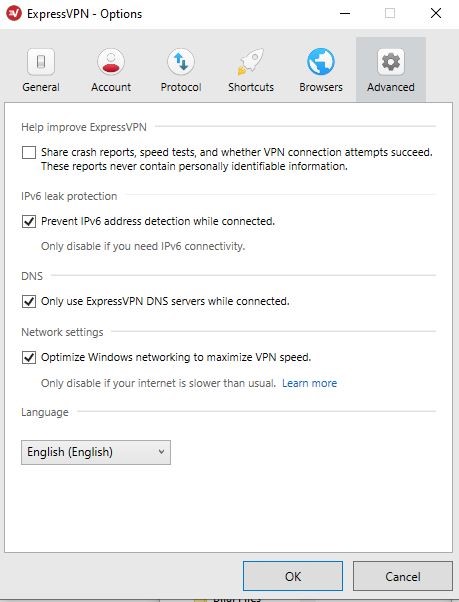
DNS protection via the company’s DNS across every server helps to prevent leaks further and thus revealing what you’re downloading or uploading via the torrent client. That’s why if it is P2P that you want to use, it can’t get any better than ExpressVPN, even in the speed and performance department.
Streaming Region-Specific Netflix with Express VPN – Possible?
The short answer is Yes! It is possible to stream Netflix via ExpressVPN. However, it isn’t as cut and dry like that. Now we’re located in Perth and connected to a US server to see if we could access Netflix’s US libraries. To our surprise, it worked 3 out of 3 times that we tried. We were also able to stream in HD without a hitch.
We then headed over to the Canadian library by connecting to a server in Toronto. Again, here too the experience is quick, easy and worked 9 out of 10 times! We then tried Germany, and for some reason ran into a couple of geo-blocks, while connected to various servers in Hamburg and Frankfurt. However, we were finally able to stream when connected to a server in Nuremberg.
We were also able to stream Netflix’s library in Chile, Brazil and a couple of other places. During this time, we didn’t experience any fuzzy pictures, stuttering or lag.
So, if bypassing Netflix’s geo-block is your priority, it does not get any better than ExpressVPN. However, there is more!
Using ExpressVPN, we were also able to stream across Hulu, HBO Go, Amazon Prime Video and BBC iPlayer. Unlike other services, it works without too much trial and error. Furthermore, we were able to bypass geo-restrictions on YouTube, Facebook, and Google in addition to others.
Privacy and Security Features
ExpressVPN uses the very best 256-bit AED encryption. It combines AES 256-bit cypher along with a 4096-bit RSA key as well as an SHA-512 HMAC authentication. In layman’s terms, all of this means that the same key that’s used to encrypt all this data needs to be to decrypt it. So, that makes it impossible to bypass or break even by using the world’s more powerful computer.
ExpressVPN also uses what’s called perfect forward secrecy. It is an advanced feature which tends to change your encryption key each time to log-into a sever. So every time you’re assigned a new key for a new session. Plus, data from any previous session is dissociated from your current session. If anyone attempts to hack your browser, they will find nothing for as long as you were connected to ExpressVPN.
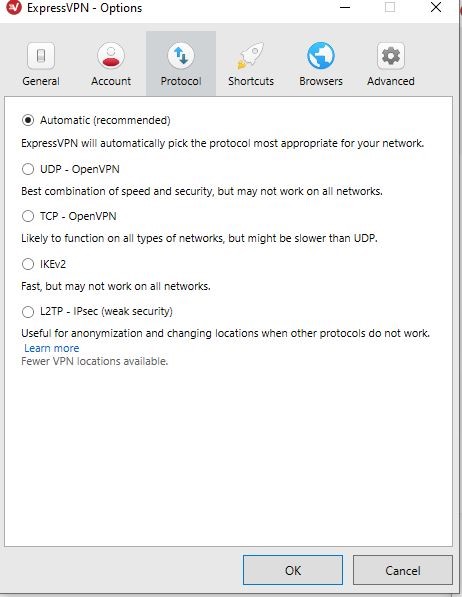
ExpressVPN uses many different security protocols and will choose the best one to ensure the most reliable connection. OpenVPN UDP is set as the default protocol, but you can also switch to PPTP, OpenVPN TCP, and L2TP/IPsec.
Kill Switch
While the Kill Switch feature isn’t exclusive to ExpressVPN, their implementation of it is highly effective. Kill Switch works by keeping a user’s IP address and traffic secure even if the connection with the server drops. ExpressVPN terms this feature a “Network Lock,” and there is a downside to it too. The downside is you don’t know when the Kill Switch is activated.
So, even though it bocks traffic while your connection to the internet is compromised, the feature is automatically enabled by default, so there is no need to enable it manually. The feature is available for Windows, Linux, Mac, and routers. On Android, this feature is called network protection, but on iOS, it is something different.
iOS does not have a kill switch, unfortunately. While that’s the downside, it certainly isn’t a complete deal-breaker.
Split Tunneling
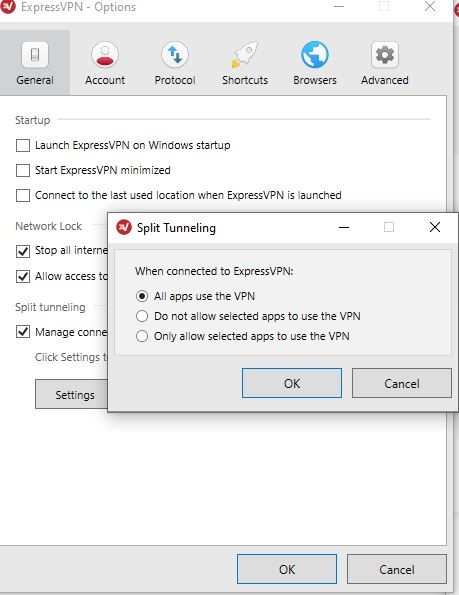
Split Tunneling is one of the ExpressVPN’s standout features and enables you to encrypt traffic through specific programs and browsers while all others can use the internet unfiltered. The feature allows you to both browse the internet via a VPN and regularly at the same time. The only thing you need to do is decide which apps use the VPN. Fortunately, ExpressVPN makes adding and removing apps easy simply click on the ‘+’ symbol to add an app.
During our time reviewing ExpressVPN, we were able to use Firefox, unfiltered and Chrome which was connected to the VPN at the same time. We streamed YouTube videos, visited websites and even checked our IP address on both browsers to verify that they were both showing different locations.
We are happy to report that the feature works as advertised.
Leak Protection
Even though all traffic is sent through an encrypted connection, there is always the possibility of it leaking a phenomenon called DNS leak. A DNS leak can reveal your online activities to your ISP, which in Australia may not be as big of an issue as it is in a country like China or Iran for instance.
A good VPN service should protect you against DNS leaks and thus guarantee your anonymity. So, we decided to run a leak test on ExpressVPN’s apps for Windows, and Android to see how secure the connection was across both devices.
While ExpressVPN does offer its own leak test, we ran our own set of tests. We used ipleak.net to run the test. We connected to servers in Canada and the UK from our Windows 10 device in Perth, Australia. Surprisingly there were no DNS leaks detected.
The report showed that IPv6 was blocked, which is primarily a request from the ISP to your device to get your IP address. So, in short, it means that our activity or even connection was completely invisible to the local ISP. Now that’s what we call anonymity!
Tor Network Compatibility
ExpressVPN boasts of having Tor compatibility. It is a rare feature, available with only a handful of VPN services. Tor offers users maximum anonymity as the data transmitted through the internet is invisible even to the VPN. The company runs independent audits, via renowned Cure3 and security advisory behemoth, PwC to ensure that their services are secure.
Our personal experience and those of others who have tested ExpressVPN’s Tor network is that it works. The security is very good if not excellent, even if you are connected to a public network.
Express VPN Logging Policy
Almost every VPN service out there claims that your information is private. However, if you look at the so-called fine print of their policies, it is easy to see that there are loopholes weaved into legal speak. That means your data is stored, saved, and possibly distributed to third parties. In the case of ExpressVPN, after having to go through their privacy policy, we can safely say that’s not the case.
Server Security Standards
The company uses what’s called TrustedServer Technology. The technology ensures that every server is run only on RAM. So, each time the system is rebooted, all data is removed since RAM can’t save or store data.
According to this standard everything, in addition to the OS is loaded fresh each time the server is rebooted directly from a read-only image on a hard drive. So, users are less vulnerable to hackers entering into these servers to steal personal information.
Virtual Servers
Each time you connect to ExpressVPN’s servers, the IP address and the server is in the same country. That said there are also a set of servers called Virtual Servers; they are virtually located in different countries. So, while the physical server might be in New York, it can show up as being in Washington DC or even Singapore for that matter.
Virtual servers allow ExpressVPN to offer a better, more reliable high-speed connection to users while ensuring that they have the IP address of the target country.
Reliability and Support
In our experience, support is one area where many VPN services lag, but here ExpressVPN is no slouch. There is a live chat service that’s available 24/7. That’s in addition to user support guides, a setup guide and FAQs. There are also a host of videos and walkthroughs.
The only thing they don’t have which we wish they did was phone support. However, in our experience chat support does not make you wait long, and the person on the other end is we connected with was helpful. So, we’ll call it a win.
Express VPN Pricing
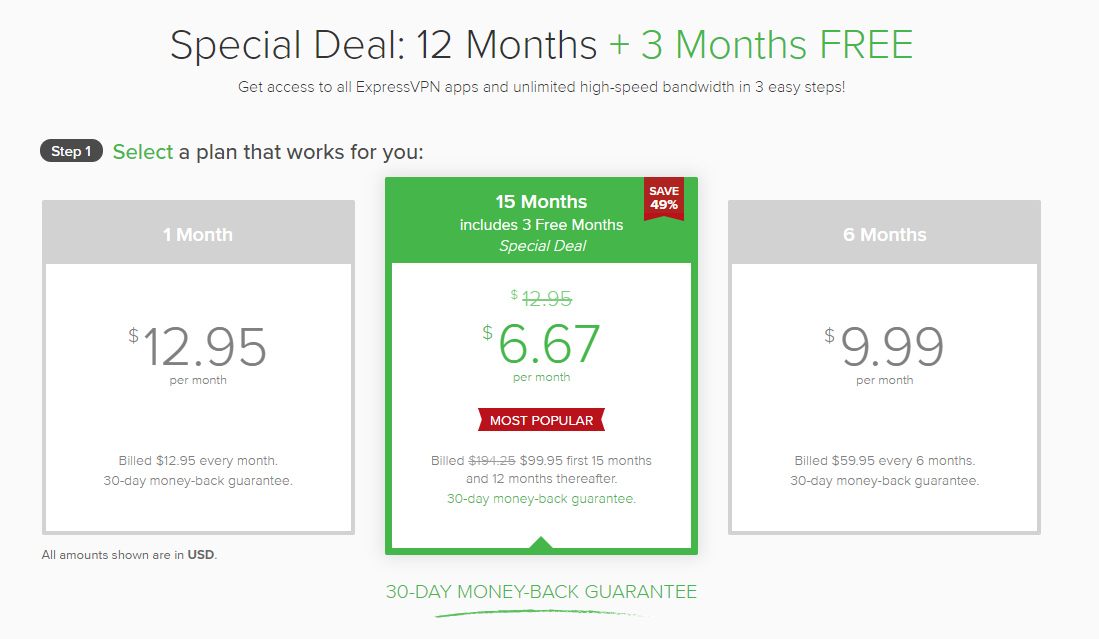
ExpressVPN’s pricing is pretty simple. You can choose to be billed monthly for $12.95 a month. You can also choose the 6-month plan, which costs $9.99 a month and the annual plan, which costs $8.32 a month, which is a 35% markdown from the original monthly pricing.
Express VPN Free Trial
Even though ExpressVPN does not have a free trial for desktops, you can download and use the iOS and Android app for 7-days free. After you’re comfortable using it and are confident that this is the right VPN for you, you can choose to pay for it in which case you get a 30-day money-back guarantee.
Is Express VPN good value for money? (talk about plans and pricing)
In our opinion, after having used ExpressVPN and many other VPNs we can safely say that it is good value for money. Sure, you’re paying more per month, but once you choose the six months or the annual plan, that’s when you start saving while using a superior product.
Speaking of superior products, ExpressVPN performed the best out of all the VPNs we retested in 2020. Not only did it connect reliably to every server we chose, but the connection was secure, the software is easy to use and most of all there are loads of security features to keep tech nerds like us happy. Furthermore, it is one of the best VPNs out there for anyone who wants to stream or download content, from geo-restricted websites.
Final Verdict
ExpressVPN is a top-of-the-line VPN service that exceeded our expectations across all platforms that we tested it on. Not only does it perform well, but they offer outstanding support, coupled with loads of privacy and security features.
The only drawback for many people reading this review is the price. While it is somewhat costlier than the competition, it’s only if you choose to pay per month. That said ExpressVPN is easier to use, more reliable and a lot more polished than any other VPN service we’ve reviewed in a while.
Our verdict is: if the price is not an issue, then ExpressVPN is the best you can get!
Double VPN system: Traffic is routed through two VPN servers and encrypted each time before it is passed through the next one.
Killswitch: When turned on prevents data leaks often a result of slight interruptions in internet service. It works by killing the connection altogether and reconnects when internet service is available and stable again.
No Logging Policy: NordVPN states that they do not generate or store any user logs which is excellent for Australians since Australia is part of the five eyes (a group of countries that share intelligence).
Dedicated Servers Task Centric Servers: NordVPN has servers best suited for torrent (P2P) and streaming services.
Military Grade Encryption: Advanced Encryption Standard with 256-bit keys.
Privacy & Anonymity
NordVPN offers AES-256-CBC encryption support via 2048-bit Diffie-Hellman key, what this means is that your connection is secure to the highest standard. However, that’s not all; the VPN is further backed by IKev2/IPsec support, which provides AES-256-GCM encryption supporting frequent key changes. So, even if attackers can penetrate one session, they can’t get through to the next. The latest encryption is available on both iOS and Mac devices by default. Though it may have to be turned on manually for Windows.
Apart from encryption, NordVPN ensures privacy especially using a technique called Onion over VPN that routes traffic through NordVPN’s servers first, then it is directed over the Onion network and finally to its destination. Yes, having two layers of privacy and security does slow down the internet but makes it near impossible for anyone to trace the connection back to you. Perhaps the best feature is you don’t have to understand how it works to make it work!
Speed and Performance
NordVPN’s primary focus is privacy and security, but speed is worth considering after all you don’t want to wait for a long time for your favorite websites to load. To check speeds we ran two types of tests. In the first set of tests we connected to only servers in Australia and in the second test we connected to servers in the US. Obviously, since the US is halfway across the world, there will be a higher latency. Though it’s worth examining since many Australians love watching American Netflix shows, so the speed has to be good!
In our latest testing on 15th May 2023, when connected to servers within Australia our download speed took a hit of about 8% on average (see graphic below). A 8% reduction in download speed is an excellent result compared to other providers we have tested. We strongly believe that you should only go for a VPN provider where you can live with the reduction in speed, otherwise we know you won’t use it! Though overall stability was fine across the multitude of times we connected, ran a speed check, then disconnected from the server.
Pre-VPN Speed – Testing carried out on 15th May 2023 Connected to NordVPN’s “fastest” server based in Australia. Testing carried out on 15th May 2023
Speeds, when connected to servers in the US, were a different matter. We saw a drastic 25% decrease in speed on average. The best server for some reason was in Washington which only slowed things down by 22%.
Unless you’re hooked up to a service offering speeds above 10Mbps, connecting to servers in the US and streaming content is going to be slow. However, connections to servers in Australia (locally) work fine for the most part.
Ease of use (Desktop and Mobile)
NordVPN is perhaps not one of the easiest VPN software to use on either mobile or desktop computers (mainly windows). While it isn’t complicated, the user interface is busy which can be intimidating to first time VPN users.
Windows and MacOS users are greeted with a map dotted with pins across various locations. Those pins represent countries where the service’s servers are located. You need to scroll to zoom into the continent and further to individual countries and then click on the pin to connect to the server in that region. Thankfully, there is also a standard list of all the countries to the left of the screen. Though it doesn’t tell you which city the server is located in.
On Android and iOS devices the UI would have been easier to use had it not been for the map that opens up. Users will have to either contend with having to pinch to zoom and choose a server or pull up the locations list to connect. Either way, the UI does take some getting used to.
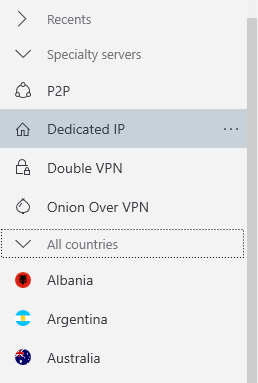
Thankfully features like Double VPN, P2P, Dedicated IP, and Onion over VPN are a single click away. On the Desktop and Mobile version of the app, it is at the top half of the list, right above the list of countries. In all our testing of the P2P option in multiple locations, it has always been reliable with torrenting.
Number of Servers and Locations Across Australia
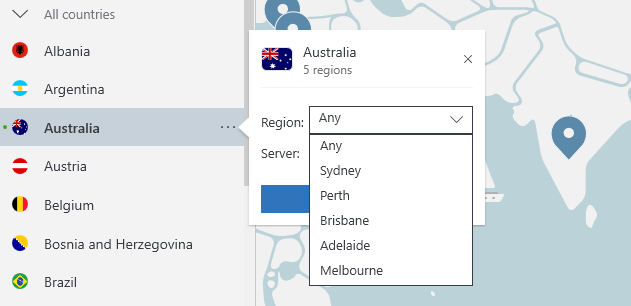
At the time of this update (May 2023), NordVPN has over 5670 servers in 60 countries. 190 of these servers are located in Australia with servers in most major cities: Sydney, Melbourne, Brisbane, Perth & Adelaide. When using NordVPN, you have the option of “quick connect” which will connect you to the most optimal server for your location, in the majority of cases this is just the closest server to you. Alternatively, you can select a city and any special features (see screenshot below).
Selecting “Australia” from NordVPN’s desktop interface gives you the option of selecting a city
NordVPN Customer Support
Apart from the extensive knowledge base, NordVPN offers both chat and email support. Chat support was friendly in our experience and answered all the questions we posted. However, email support can take up to 24 hours to reply. Those who need help can also open a ticket which also tends to take around 24 hours for the support team to answer. It isn’t the best, but they do solve your problem at least in our case.
Value for money
NordVPN isn’t the cheapest service around but it certainly one of the more privacy and security-focused ones. However, if security is your top priority, then it is worth the purchase. That said if you’d instead use something that’s fast and easy to understand then, unfortunately, NordVPN does not offer the best value.
Our Verdict
To most people, including ourselves speed, user-friendliness, and security matter a great deal. The map-based interface is awkward, and the speed is a bit of a letdown, but if you can put up with all of this in favor of ironclad privacy and security features then NordVPN is certainly worth a shot!
With an excellent 30 day money back guarantee we definitely recommend NordVPN